On This Page
Click to Pay Customer Authentication
Click to Pay
Customer AuthenticationWhen you enable customer authentication through
Click to Pay
, you give
Visa Acceptance Solutions
permission to request that Visa and Mastercard provide
an authenticated payload for each transaction. Authentication takes place within the
authentication service of each card type. You must inspect the payload that is returned
to you to determine if the transaction is authenticated. For information about enabling customer authentication through
Click to Pay
, see these topics:When the customer completes a transaction using a Visa or Mastercard
Click to Pay
credentials, authentication is managed within Click to Pay
. When the customer checks out using manual card entry and
does not save their card to Click to Pay
, the transaction is not
processed through Click to Pay
and you must complete authentication based
on your existing authentication method.IMPORTANT
American Express cards cannot be
authenticated through
Click to Pay
customer authentication. You must
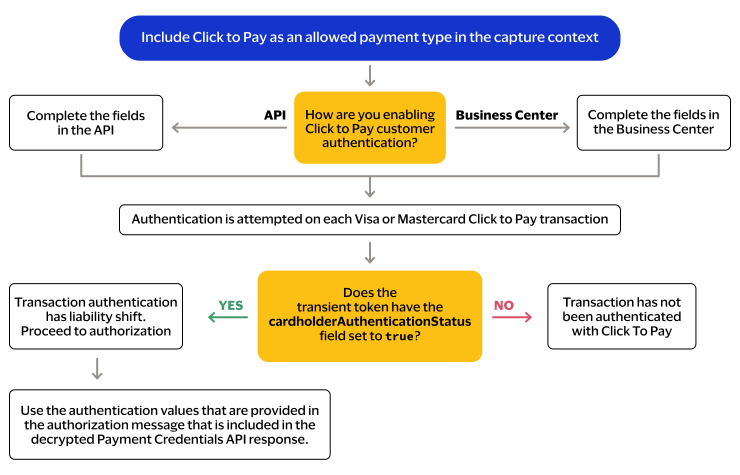
use another authentication method for this card type.Authentication Flow
This image shows the
Click to Pay
authentication flow: