Card Present Connect | Mass Transit Developer Guide
This section describes how to use this guide and where to find further
information.
Audience and Purpose
This guide is written for application developers who want to integrate
payment processing for mass transit fare collection systems. These
services are available using only the REST API.
Implementing these services requires software development skills and
knowledge and understanding of the card scheme mass transit rules. You
must write code that uses the REST API request and response fields to
integrate the payment services into your existing mass transit fare
collection system.
Conventions
These special statements are used in this document:
IMPORTANT
An
Important
statement contains information essential to
successfully completing a task or learning a concept.
WARNING
A
Warning
contains information or instructions,
which, if not heeded, can result in a security risk, irreversible loss
of data, or significant cost in time or revenue or both.
Related Documentation
Contact the card schemes for these technical documents:
Discover Global Network Contactless D-PAS: Open Loop Transit
Implementation Guide
Mastercard Global Transit Implementation Guide
Mastercard Transit Solutions
Mastercard Transit Terminal Requirements
Visa Contactless Transit Implementation Guide
Visa Contactless Transit Terminal Implementation Guide
Visa Transforming Urban Mobility
Recent Revisions to This Document
26.06.01
Revised and combined Mass Transit Transactions section and Mass Transit
Transaction Workflows section into a new section: Mass Transit Models and Workflows.
Introduction to Card Present Connect | Mass Transit
Card Present Connect | Mass Transit is the
Visa Acceptance Solutions
solution for
processing transactions using card scheme mass transit models. This solution follows
global card scheme standards for contactless EMV transit transactions.
Transit Rider Benefits
These are some transit rider benefits:
Retail-like contactless payment experience.
Fast, contactless tap to enter and exit.
Payment card data protection.
Single, combined payment for multiple trips during a set period.
Ability to request journey history and corresponding receipt.
Travel fare total on payment card statements.
Consistent fare collection experience across transit systems in various cities and
countries.
Transit System Benefits
These are some mass transit systems benefits:
Lower ticketing overhead that can reduce the need for ticket booths or paper tickets.
Ability to track riders when they tap to enter and exit.
Flexible fare management, including:
Riders pay as they go.
Fares are aggregated for one payment transaction each travel period.
Zero amount authorization request that you send to determine whether the
payment card is valid.
Aggregated
Transaction in which you calculate the fare based on multiple
contactless card taps for trips during a predetermined time period,
usually 24 hours, processed as a single transaction.
Back office
A component within your transit systems that processes the taps received
from transit readers, and that performs any or all journey construction,
fare calculation, risk management, and payment processing.
Card hash
One-way hash token ID of the payment card data that is used to maintain
the deny list.
Combined data authentication (CDA)
Authentication technique that uses a combination of card and transaction
data.
Deferred authorization
Combined authorization and capture request, also known as a sale, for
aggregated fare payments.
Deny list
List of cards that failed ODA because of an unsuccessful AVR or transit
payment. It is used for blocking cards that have not been accepted for
travel within your transit system when you are processing aggregated
payments, such as the Mastercard PAYG and Visa MTT models.
Deny list manager
Manages the deny list and distributes it to the validators.
First Ride Risk debt recovery
Under specific and limited conditions established by the card schemes,
you can recover the cost of the first ride by capturing a declined
authorization. For details, refer to each of the card scheme's rules for
mass transit chargeback thresholds and protection. See First Ride Risk.
Instrument identifier token
Token Management Service
token that stores the payment card number.
Journey construction
The process of analyzing individual taps received from transit readers
and forming logical journeys performed by cardholders.
Mobility and Transport Transaction (MTT)
Visa model for contactless mass transit payments for single or multiple
modes of transportation, which includes fixed, distance-based, and
time-based fares.
Offline data authentication (ODA)
EMV security feature in which payment cards are authenticated offline.
ODA is necessary so that cardholders can quickly tap and enter the
transit system. It is used for aggregated transactions, such as
Mastercard PAYG and Visa MTT.
Pay As You Go (PAYG) for Mastercard
Mastercard model in which the fare is not known when the cardholder taps
their card for travel. All cardholder taps are recorded to calculate the
fare and process an aggregated payment.
Payment instrument token
Token Management Service
token that stores the instrument identifier
token, card expiration date, and billing address.
Retail
Transaction in which you process the payment as a standard contactless
retail payment.
Tap
Refers to the act of presenting a contactless card at a validator.
Ticket inspection
Process in which ticket inspectors verify compliance with fare policies
by checking paper tickets or using a portable terminal to read the
payment card.
Ticket inspectors
Transit employees who travel on the transit system to verify passenger
travel status.
Transient token
Unique, time-limited token ID that is associated with the tokens created
by TMS. The validator forwards this ID to your back office to use for
payment transactions and to manage tokens.
Visa Acceptance Solutions
automatically deletes this token after seven days.
Travel period
Period of time during which a traveler can make multiple taps in and out
of the transit system, before you submit the final payment transaction
for the aggregated amount.
Validator
EMV contactless card-present terminal located at an automated turnstile
device where cardholders tap their card to enter, and optionally exit
from, the transit system. Before allowing the cardholder to enter the
transit system, the validator checks the deny list to ensure that the
card has not failed ODA.
Mass Transit Prerequisites
Before integrating
Visa Acceptance Solutions
services for mass transit, you must have
these systems in place:
Merchant account with an acquirer that is enabled for mass transit transactions on
Visa Platform Connect
.
Visa Acceptance Solutions
account for payment services.
Payment technology provider (PTP) that is integrated with
Visa Acceptance Solutions
and can perform message-level validation (MLV).
EMV Level 1 certified transit terminals and EMV Level 2 certified software in
preparation for EMV Level 3 Certification.
Mass Transit Validation and Certification
You must complete validation and certification activities before your system can go live.
Work with your payment technology provider (PTP) to complete message-level validation
(MLV) and EMV Level 3 certification of your transit fare processing system. You must
pass MLV before beginning EMV Level 3 certification.
Message-Level Validation
Message-level validation (MLV) is a script-based, field-level validation against
Visa Acceptance Solutions
specifications.
Your PTP uses amount-based test triggers to send transactions into a test environment and
the Visa Certification Management System for decryption. The test results are XML or
RESTful output,
Business Center
test transactions, and log prints.
Visa Acceptance Solutions
uses these activities to validate the results:
Cross edit checks
Data element validation
Interchange compliance
Data mapping validation
EMV Level 3 Certification
This section describes the Level 3 certification process used by
Visa Acceptance Solutions
and
Visa Platform Connect
. The certification processes and
support for Global Card Present Connect projects and for direct merchant and acquirer
projects differ from what is described here, but the timelines are basically the
same.
Certification
is a formal process used to validate
that the device and application are compliance with card scheme acceptance regulations.
The certification team uses a brand test tool and simulator during the certification
process, which includes these elements:
A payment card simulation tool such as UL, ICC, or Fime.
Failed case analysis and resolution.
For Mastercard certification, your PTP submits results to Mastercard and pays
the costs for approved partners that Mastercard uses.
For Visa certification,
Visa Acceptance Solutions
submits results to
Visa.
Waivers from the card schemes for exceptions.
Card schemes responses or Letter of Approval (LOA) to signify acceptance and
Level 3 certification.
For information about how to design an EMV Level 3 certified payment application, see
First Ride Risk (FRR) is a feature that addresses the liability for the first use of a
payment credential that fails pre-authorization and might result in a refusal for
travel. Use FRR to capture a transaction even when the pre-authorization fails. In this
case, the merchant or acquirer assumes responsibility for the risk.
First Ride Risk Eligibility Reason Codes
When a failed pre-authorization returns one of these response codes in the
processorInformation.responseCode
field, the transaction is
eligible for FRR and capture:
01
: Refer to card issuers.
04
: Pick-up.
05
: ID certification fails.
12
: Invalid related transaction.
13
: Invalid amount.
14
: Invalid card number (no such account).
21
: Card not initialized.
22
: Suspected malfunction, related transaction error.
34
: Fraud.
38
: PIN try limit exceeded.
40
: Function requested not supported.
41
: Lost card.
43
: Stolen card.
57
: Transaction not allowed to be processed by
cardholder.
58
: Transaction not allowed to be processed by
terminal.
59
: Suspected fraud.
62
: Restricted card.
68
: Issuer response timeout.
75
: Allowable number of PIN tries exceeded.
90
: Cutoff is in progress.
91
: Issuer cannot process.
97
: ATM/POS terminal number cannot be located.
98
: Issuer response not received.
99
: PIN block error.
1A
: The transaction needs additional customer
authentication.
A0
: MAC failed.
N1
: Items not on Bankbook beyond limit, declined.
P1
: Contact phone number of cardholder cannot be found in
the issuer’s system.
Transit Test Cases
Message-Level Validation Test Cases
Case #
Transaction
Card Type
Amount
Comments
Visa AVR and Sale for Aggregated
Transaction
1
Account verification request (AVR)
Visa
0.00
For Visa, an AVR is performed when the card is first used in the
transit system or on a more frequent basis depending on what the PTO/PTP
requires.
2
Deferred sale for aggregated transaction
Visa
9900.00
Visa First Ride Protection
3.1
Deferred sale for an aggregated transaction
Visa
9904.00
Response is a decline that is eligible for capture.
3.2
Follow-on capture
Visa
9904.00
Even though the amount exceeds what is allowed for captured under
Visa's First Ride Protection rules, proceed with the capture in order to
complete this test case.
Mastercard Authorization and
Capture
4.1
Authorization for an aggregated transaction
Mastercard
10.00
4.2
Follow-on capture of an aggregated transaction
Mastercard
9900.00
Debt Recovery
5.1
Deferred sale
Mastercard, Visa
9904.00
Response is a decline that is not eligible for capture. Attempt to
reclaim debt using MOTO, tap-initiated, merchant-initiated,
card-not-present debt recovery.
5.2
MOTO debt recovery
Mastercard, Visa
9601.00
Response is a decline, but it allows you to validate the Debt
Recovery payload.
6.2
Tap-initiated debt recovery
Mastercard, Visa
9904.00
Response is a decline, but it allows you to validate the Debt
Recovery payload.
7.2
Merchant-initiated debt recovery
Mastercard, Visa
9904.00
Response is a decline, but it allows you to validate the Debt
Recovery payload.
8.2
Card-not-present debt recovery with payer authentication
Mastercard, Visa
9904.00
Response is a decline, but it allows you to validate the Debt
Recovery payload.
9.2
Card-not-present debt recovery without payer authentication
Mastercard, Visa
9904.00
Response is a decline, but it allows you to validate the Debt
Recovery payload.
Follow-On Transactions
12.2
Stand-alone credit on test case 02
Visa
20.00
Validates your ability to process a credit for an overcharged amount.
13.2
Void on stand-alone credit test case 12.2
Visa
9900.00
Validates your ability to void a stand-alone credit that was processed
incorrectly.
14
Reversal of test case 02
Visa
9900.00
Validates your ability to reverse an authorized amount when the final fare is higher
than what was originally authorized. After a reversal, resubmit the
correct sale amount.
Transaction Search
15.1
Deferred sale
Visa
9900.00
Ignore the response in order to simulate a timeout.
15.2
Transaction Search
—
—
The test case 15.1 should show as successful, and therefore no
further action is required. If the transaction was declined, the
transaction would be placed on the deny list, and first ride protection
or debt recovery process should be initiated.
Mass Transit Models and Workflows
The Mass Transit solution supports a variety of payment models and workflows for transit
fare collection and management.
This section describes card-specific mass transit models and workflows. Each card type
has a distinct mass transit model and transaction workflow that defines how fares are
authorized, processed, and settled. Common workflows that are not card specific are also
discussed.
American Express Mass Transit Model
The American Express mass transit model is American Express Pay As You Go (PAYG). It is a
delayed authorization model that uses the Expresspay transit policy workflow.
American Express Pay As You Go Model Capabilities and
Features
This section describes the capabilities and features of the American Express PAYG
model.
The table lists the mandatory (M) and optional (O) capabilities of this mass transit
model.
These are the key features of the American Express PAYG model:
Journeys are multimodal.
Fares are based on distance.
Points of entry are contactless.
Accounts are verified with an authorization for a nominal amount or the maximum fare
amount.
The deny list is checked so that cardholders with previously declined transactions
can be blocked.
Data can be authenticated offline to confirm that the card is valid.
Multiple card taps and fares can be aggregated into a single payment.
The deny list is automatically updated every 20 minutes.
The back office records all trips and fares in order to reconstruct journeys and
calculate the final fare.
When the nominal amount authorization is declined, debt recovery can be
performed.
Standard follow-on payment services can be used to capture, reverse, or void
transactions.
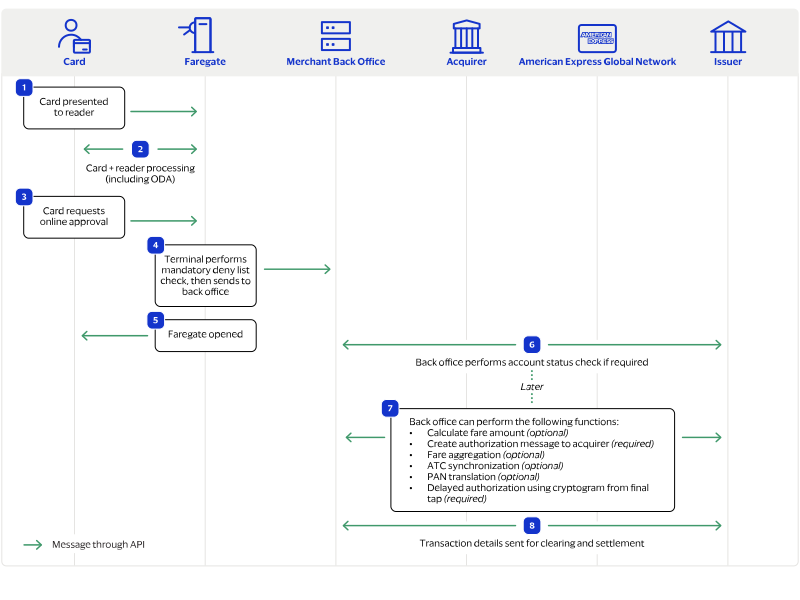
American Express Pay As You Go Workflow
American Express PAYG is a delayed authorization model that uses the Expresspay transit
policy workflow. It begins when the rider taps a payment card at the fare collection
terminal.
Figure:
Pay As You Go Delayed Authorization Model
The cardholder taps the card to enter the transit system.
The gate validates the card using offline data authentication (ODA), the card
expiration date, and the deny list.
When the card is valid, the gate allows the passenger to enter the transit
system.
When the ODA fails, the card is added to the deny list, and the debt recovery
process begins. See Debt Recovery Workflows.
When the authorization is successful, you calculate the fare for the travel
period.
When the fare is more than 15.00 USD, an authorization or sale request for the
higher amount is sent. See Discover Sale with EMV Data.
At the last tap of the day, a follow-on capture request for the day's
aggregated fare amount is sent.
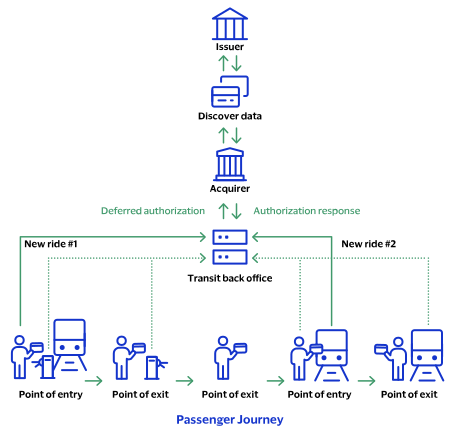
Discover Pay As You Go Aggregated Transactions
When the cardholder taps their Discover card in a transit system, initiate an aggregated
transaction by requesting an authorization for 1.00 USD that includes the
If the issuer approves the authorization, subsequent taps do not require an
authorization. The capture amount must not exceed 15.00 USD in the US, and the capture
date must not exceed the aggregation duration of up to 14 days from the first tap
transaction.
If the aggregate total nears the maximum aggregation amount, and the next tap will cause
the aggregation amount to exceed 15.00 USD, capture the existing aggregate total. Then,
authorize the current tap for 1.00 USD to begin a new aggregation cycle, and include the
Common Mass Transit Transaction Workflows and Features
This section describes mass transit transaction workflows and features that are common across
supported card schemes.
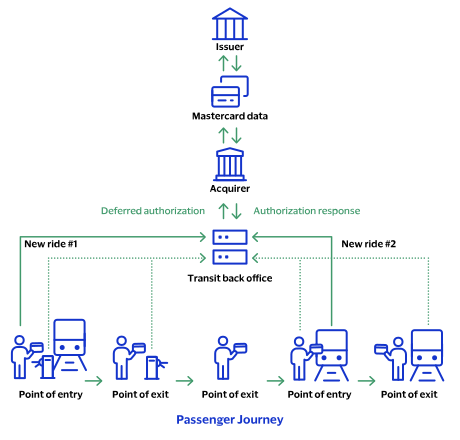
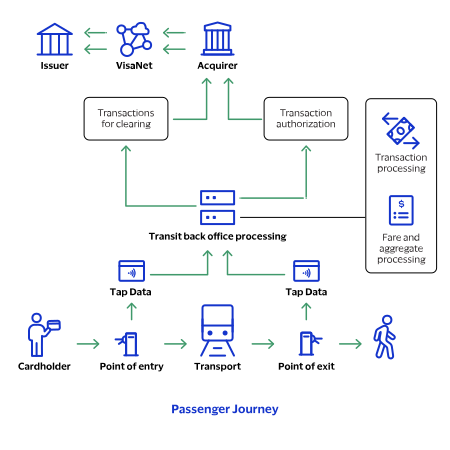
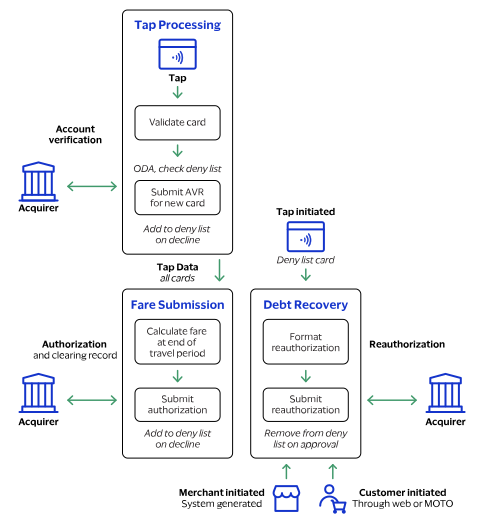
Aggregated Fare Transaction Workflow
This section describes the Aggregated Fare transactions workflow. In this workflow, the
final transit fare is not always known at the time of travel. It is calculated at the
end of a travel period, typically 24 hours, based on the journeys made during that
period and any applicable fare limits. An
aggregated transaction
is used on
contactless terminals at transit system access points to support fare calculation after
the travel period has ended.
Figure:
Aggregated Fare Transaction Workflow
Aggregated Model with the
Token Management Service
Using tokens can reduce the amount of cardholder information that your systems store,
process, or transmit. This approach can simplify your Payment Card Industry Data
Security Standard (PCI DSS) compliance efforts for maintaining a secure payment
processing environment.
When you integrate aggregated acceptance models with the
Token Management Service
(
TMS
),
TMS
tokenizes, stores,
and manages customer and payment data. You store these tokens in your environment
instead of customer payment details.
Use
TMS
to store these types of data:
EMV track 2 equivalent
EMV tag-length-value (TLV) string of tags for use during payment
authorization
Card number (
TMS
instrument identifier)
Card hash value (used within deny list management systems)
TMS
uses a cryptographic base derivation key (BDK) to create
tokens that represent the customer and payment data. You store these tokens in your
environment and databases instead of customer payment details.
Aggregated Model with the
Token Management Service
Workflow
The Aggregated Model with
TMS
workflow begins when the rider taps a
payment card at a fare collection reader (terminal) in the transit system.
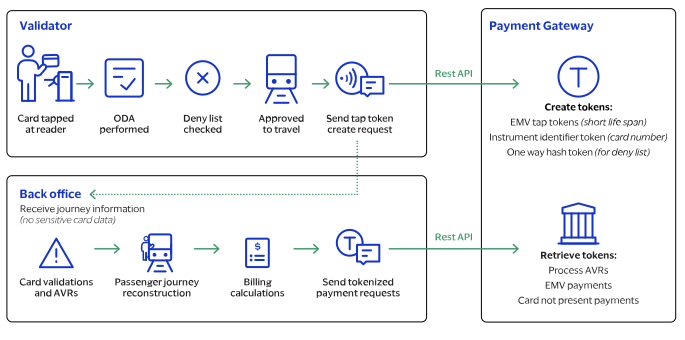
Figure:
Transit Transactions with
TMS
Workflow
First Tap Process with
TMS
This process begins when the rider taps their card at the validator.
Rider taps card at the validator.
The terminal uses the Level 3 payment application to generate a card hash and
checks the deny list for the card hash.
When the card hash is on the deny list, the card is not approved for travel and
the terminal does not open the gate.
When the card hash is not on the deny list, the card is approved for travel and
the terminal opens the gate and begins the account verification request (AVR)
process.
The rider performs additional taps as required by the transit system during the
travel period.
AVR Process with
TMS
This process begins when the validator sends the transient token data to the back
office.
The validator sends this tap data to
TMS
to tokenize
the data:
Transient token, in the ID field
Card hash
Fluid data descriptor, encoding, and value
TMS
creates tokens of the tap data and stores the card
hash with the tokens.
The back office performs a verification request as required by the card scheme
transit model.
The back office uses the transient token ID for these requests:
Retrieving the token IDs for debt recovery and BIN lookup requests
Performing an AVR, deferred authorization, and follow-on
transactions
End of Travel Period Process with
TMS
This process begins at the end of the travel period.
At the end of the travel period, the back office calculates the fare and sends a
deferred authorization, which can be a combined authorization and capture, using
the transient token ID in place of the card data.
If the authorization fails, the back office retrieves the card hash from
TMS
, adds the card hash to the deny list, and
begins the debt recovery process.
Debt Recovery Process with
TMS
This process begins when your back office requests debt recovery.
In accordance with the relevant card scheme rule set, the back office requests a
merchant-initiated debt recovery using the instrument identifier token ID in
place of a card number.
When debt recovery is successful, the back office uses the card hash token to
retrieve the full card hash value.
The back office removes the card hashes from the deny list.
When the debt recovery fails, the associated card hashes stay on the deny
list.
Near Real-Time Workflow
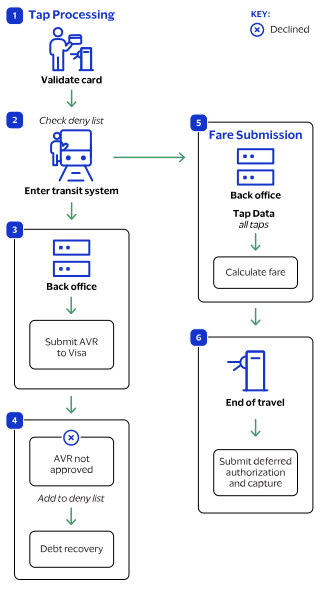
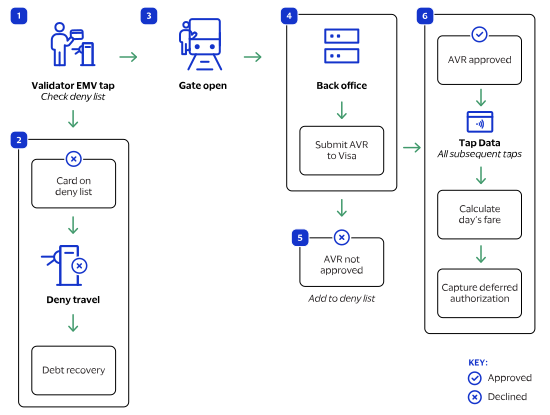
The near real-time workflow begins when the cardholder taps a payment card at the
validator to enter the transit system.
Figure:
Near Real-Time Workflow
The validator checks the deny list for the payment card.
When the card is on the deny list due to a previous failed payment, the validator
does not open the gate, and the payment is processed through a debt recovery
workflow. See the Debt Recovery Workflows.
When the card is not on the deny list, the validator opens the transit gate for the
cardholder to travel.
A new transient token is generated for processing the account verification request
(AVR).
The back office sends an account verification request (AVR) to
Visa Acceptance Solutions
.
When the AVR fails, the card is added to the deny list and might be eligible for the
first ride risk debt recovery.
When the AVR is successful, the card data is used to track subsequent taps,
calculate fares for the day, and capture the deferred authorization.
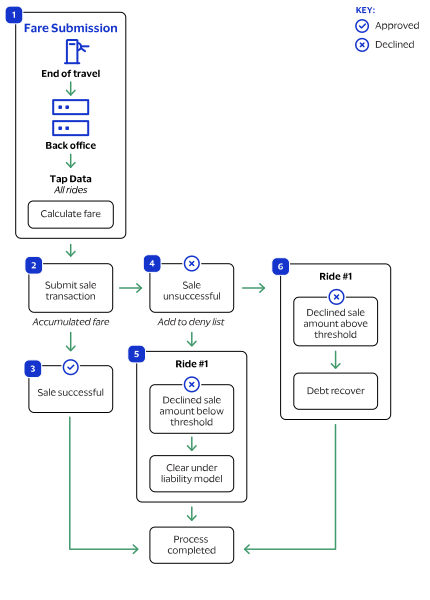
Fare Calculation and Submission Workflow
The fare calculation workflow begins at the end of the travel period.
Figure:
Visa Fare Calculation and Submission Workflow
The back office calculates the fare of all rides taken during the travel
period.
When the sale is successful, the process is complete.
When the sale is declined, the card hash is added to the deny list.
When the declined sale amount is above the chargeback threshold, the transaction is
moved to debt recovery. See Debt Recovery Workflows.
When the declined sale amount is for a first ride and below the chargeback
threshold, you can request the payment using the first ride risk chargeback rules as
defined by each card scheme.
Debt Recovery Workflows
Debt recovery workflows show how to use debt recovery transactions to collect outstanding
debt when an aggregated end-of-day transaction is declined.
Card schemes require merchants to support merchant-initiated debt recovery. This type of
transaction can also be required to remove a card from a deny list. Each card scheme has
its own transaction-processing rules for debt recovery retry attempts, transaction time
limits, and related mass transit transactions. For more information, see each card
scheme's rules for transit debt recovery retry attempts and transaction time limits.
IMPORTANT
Use a debt recovery transaction to remove a card from a deny list.
This action must be completed within one hour of receiving the authorization
approval.
These debt recovery transactions are supported:
A merchant-initiated transaction that uses the card number.
A tap-initiated transaction that uses the EMV track 2 equivalent and EMV tags
created when the cardholder re-enters the transit system.
A cardholder-initiated transaction that the customer requests by contacting
you.
When a debt recovery transaction is declined, you can request payment using the First
Ride Risk liability model. For more information, see each card scheme's rules for mass
transit transaction chargebacks.
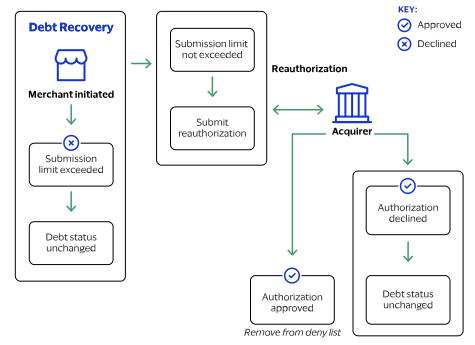
Merchant-Initiated Debt Recovery
A
merchant-initiated
(MIT)
debt recovery
transaction is a deferred
authorization that originates from your back office. This type of transaction is
also called
auto-debt recovery
. The authorization resubmission typically uses
the card number and references the original, end-of-day transaction that was
declined. Visa allows up to six authorization resubmissions within 14 days.
Figure:
Visa Merchant-Initiated Debt Recovery Workflow
When the number of retry attempts for the MIT debt recovery transaction exceeds
the card scheme’s limit, stop further processing and keep the card on the deny
list.
When the transaction is declined, keep the card on the deny list.
When the transaction is successful, remove the card from the deny list.
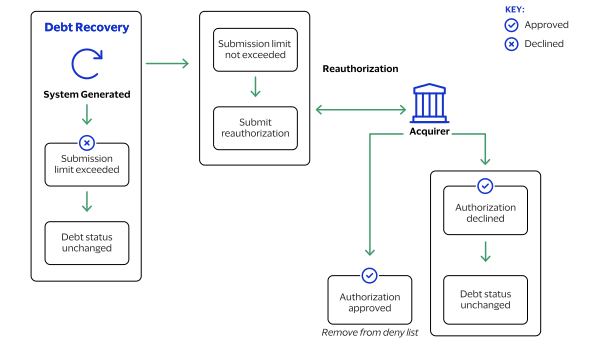
Scheduled Debt Recovery Transaction Resubmission
A
scheduled debt recovery
transaction is a system-generated transaction that
originates from your back office. This transaction typically uses the card number
and references the original, end-of-day transaction that was declined. Multiple
authorization resubmissions might be triggered within 14 days.
Figure:
Scheduled Debt Recovery Workflow
You configure your payment system to generate scheduled debt recovery
authorization requests.
The scheduled authorizations attempt debt recovery submissions within 14 days of
the initial transaction.
When the number of retry attempts for the scheduled debt transaction exceeds the
card scheme’s limit, stop further processing and keep the card on the deny
list.
When the amount is below the debt recovery amount limit, send a sale
request.
When the transaction is declined, keep the card on the deny list.
When the transaction is successful, remove the card from the deny list.
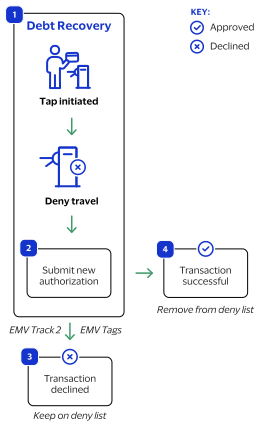
Tap-Initiated Debt Recovery
A
tap-initiated debt recovery
transaction occurs when the cardholder returns
to the transit gate, and the validator recognizes a new contactless tap.
You can deny the rider entrance unless the tap-initiated debt recovery transaction is
attempted in real time while the cardholder is at the gate. The authorization
request includes the EMV track 2 equivalent and EMV tags from the new tap, and a
future capture date.
Figure:
Tap-Initiated Debt Recovery Workflow
The cardholder taps their card to enter the transit system.
You submit a new authorization request using the EMV track 2 equivalent and EMV
tags created by the validator and a capture date in the future.
When the transaction is declined, keep the card on the deny list.
When the transaction is successful, remove the card from the deny list.
Cardholder-Initiated Debt Recovery
A
cardholder-initiated debt recovery
transaction occurs when the cardholder
contacts you. The method of contact depends on where the transaction occurred such
as on your e-commerce website or by phone or email for a mail order or telephone
order (MOTO) transaction.
Figure:
Cardholder-Initiated Debt Recovery Flow
The cardholder contacts you through your website or by phone or email for a MOTO
transaction.
You process a card-not-present (CNP) authorization.
When the request is successful, remove the card from the deny list.
When the request fails, leave the card on the deny list.
Using Multiple Accounts for Processing Functions
Mass transit systems can use multiple accounts to support a variety of processing
functions. Processing functions include these types of tasks:
Creating tap tokens
Processing payment requests
Retrieving card hash values
Supporting customer journey history inquiries
Each processing function is handled by a separate account to improve security,
isolation, and operational clarity. These accounts are available in the Mass Transit
solution:
Account 1
This account processes tap token create requests only. For this option, the
validators communicate directly with
Visa Acceptance Solutions
. Using a
separate account enables you to deploy a separate security key to the validator
system.
Account 2
This account processes payment requests using tokens. You can also choose to
further separate debt recovery transactions from standard payment transactions.
In that case,
account 2a
is dedicated to standard payment
transactions, and
account 2b
is dedicated to debt
recovery transactions.
Account 3
This account processes card hash retrieval requests only. The responses include
the full, unmasked card hash value. Using a separate account enables you to
deploy a separate security key to the validator system.
Account 4
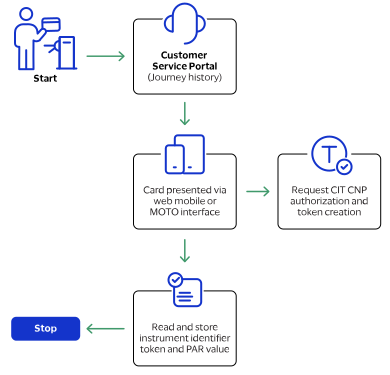
This account operates a customer service web portal where riders can make
journey history inquiries. The riders provide the card number to a hosted
payment service (such as
Visa Acceptance Solutions
Secure Acceptance) where
they register as a user. Registration produces the
TMS
instrument identifier token and the card scheme PAR value. These values can be
used by your back-office system to look up journey and billing information.
Journey History Service
Card schemes might require transit operators to provide cardholders with a journey
history service that enables the cardholder to view their journey history and receipt
information. Refer to card scheme documentation for more information about each card
scheme's requirements for journey history.
Payment Account Reference
Visa Acceptance Solutions
supports the use of the payment account reference (PAR)
by providing the PAR value in authorization responses when a PAR is available from
the card issuer. The PAR response field is
. Using the
PAR enables you to track card accounts when digital devices, such as smart phones
and smart watches, have a network token or DPAN that the card issuer provided to the
device. You can use the PAR to provide journey history to cardholders and to match
the card account FPAN and DPAN values.
Merchant Descriptor
You can use the merchant descriptor feature to produce a transaction-specific
reference that cardholders can see on their card account statement. To use the
merchant descriptor feature, include the
merchantInformation.merchantDescriptor.name
field in your
authorization, credit, and capture requests. The value for the field must consist
solely of English characters.
IMPORTANT
Before implementing transit journey history functionality,
confirm with your acquirer and card schemes that the PAR and merchant descriptor
features are supported.
Additional Information
For information about the
Visa Acceptance Solutions
card-not-present services that
support a transit system's journey history service, see the
The Journey History Service workflow begins when begins when the rider taps a payment
card at a fare collection terminal. This service enables the cardholder to view
their journey history and receipt information. See card scheme documentation for
more information about each scheme’s journey history requirements.
Figure:
Journey History Request with Token Creation Workflow
Mass Transit Payment Services Using EMV and Card Data
You can request these payment services for mass transit with EMV and card data:
Authorization for account verification and debt recovery.
Sale for aggregated fares and debt recovery.
Stand-alone credit.
The EMV Data Elements and Tags table lists details about EMV tags that are mandatory (M),
prohibited (P), optional (O), or conditional (C) for the processor. Send a conditional
tag when it is present in the card and terminal.
EMV Data Elements and Tags
Data Element
EMV Tag
American Express
Discover PAYG
Mastercard PAYG
Visa MTT
Transaction Date
9A
M
M
M
M
Transaction Type
9C
M
M
M
M
Transaction Currency Code
5F2A
M
M
M
M
Terminal Country Code
9F1A
M
M
M
M
Amount Authorized
9F02
M
M
M
M
Amount Other
9F03
M
M
M
M
Application PAN Sequence Number
5F34
M
P
C
O
Application Transaction Counter (ATC)
9F36
M
M
M
M
Application Interchange Profile (AIP)
82
M
M
M
M
Dedicated File (DF) Name
84
M
M
M
M
Terminal Verification Results (TVR)
95
M
M
M
M
Issuer Application Data
9F10
M
M
M
M
Application Cryptogram
9F26
M
M
M
M
Cryptogram Information Data (CID)
9F27
M
O
M
O
Terminal Capabilities
9F33
M
M
M
M
Cardholder Verification Method (CVM) Results
9F34
O
O
M
O
Unpredictable Number (UN)
9F37
M
M
M
M
Form Factor Indicator
9F6E
C*
C
O (Authorization)
P (Refund)
C
Mastercard Authenticated Application Data
9F60
Does not apply
Does not apply
O
Does not apply
Mastercard Kernel Identifier‐Terminal
96
Does not apply
Does not apply
O
Does not apply
*
Contactless American Express transactions
: If the Form Factor Indicator data is
available on the card, then the merchant, acquirer, or processor must forward this
information to the issuer.
Mass Transit Transaction Types
This section describes mass transit transaction types and related field values. When you
include the transaction type in your mass transit request, it appears in the
Business Center
and on transaction reports.
To include the transaction type in your request, set the
clientReferenceInformation.comments
request field to the
transaction value that corresponds to the service category.
These are transactions type categories:
TransitDA
Use this category for transit deferred-aggregated (DA) transactions. These
transactions are also called
Visa MTT
and
Mastercard PAYG
transactions.
BAU
Use this category for business-as-usual (BAU) transactions that represent no
exceptions or errors for cardholders.
FRR
Use this category for first-ride-risk (FRR) transactions that occur where the
First Ride Risk liability shift is used. These transactions are specific to a
card scheme and region.
DR
Use this category for debt-recovery (DR) transactions initiated by the merchant
or when the cardholder taps a contactless card at a validator to enter the
transit system.
DR CIT
Use this category for debt-recovery (DR) customer-initiated transactions (CIT)
that are initiated by the cardholder when they explicitly pay a debt, including
e-commerce and telephone orders.
Service
Use this category for standard transactions when completing payment
transactions.
Error
Use this category for standard transactions when handling transaction
errors.
These tables list the field values for the payment services supported by each transaction
type.
Business as Usual (BAU) Transaction Field Values
Service
Field Value
Description
Authorization
TransitDA BAU zero value auth
Zero amount authorization to verify a card.
Authorization
TransitDA BAU nominal value auth
Nominal value authorization to verify a card.
Authorization
TransitDA BAU full value auth
Deferred aggregated authorization for the aggregated value that is
sent at the end of the travel period.
Sale
TransitDA BAU full value sale
Deferred aggregated authorization and capture for the aggregated
value that is sent at the end of the travel period.
Capture
TransitDA BAU capture
Capture of any business as usual authorization. Can be a nominal
authorization or full value authorization.
Capture
TransitDA BAU capture (split)
Capture without a previous authorization. Used by Mastercard PAYG in
the UK.
Authorization
TransitDA BAU registration auth
Zero amount authorization as part of journey history service. Can
include CVV2 and 3-D Secure 2.x.
First Ride Risk (FRR) Transaction Field Values
Service
Field Value
Description
Authorization
TransitDA FRR full auth
Full amount authorization for a previous verification authorization
request that was declined. Decline response is common.
Capture
TransitDA FRR capture
Forced capture of a declined authorization when FRR funding
applies.
Authorization
TransitDA FRR MIT DR auth
Merchant-initiated authorization to clear a debt status after the
TransitDA FRR authorization is processed. If successful, the FRR capture
is reversed.
Reversal
TransitDA FRR MIT DR reversal
Reversal sent if previous TransitDA FRR MIT DR authorization was
successful.
Authorization
TransitDA FRR tap DR auth
Authorization sent following a card tap to clear a debt status after
TransitDA FRR authorization is processed. If successful, the FRR capture
is reversed.
Reversal
TransitDA FRR tap DR reversal
Reversal when a TransitDA FRR tap DR authorization was
successful.
Debt Recovery (DR) Transaction Field Values
Service
Field Value
Description
Sale
TransitDA Debt recovery MIT sale
FPAN
TransitDA Debt recovery MIT sale
DPAN
Merchant-initiated debt recovery authorization and capture using a
FPAN or DPAN.
Authorization
TransitDA Debt recovery MIT auth
FPAN
TransitDA Debt recovery MIT auth
DPAN
Merchant-initiated debt recovery authorization using a FPAN or
DPAN.
Capture
TransitDA Debt recovery MIT capture
Merchant-initiated debt recovery capture of a previous TransitDA Debt
recovery MIT authorization transaction.
Sale
TransitDA Debt recovery tap sale
Tap-initiated EMV debt recovery authorization and capture.
Authorization
TransitDA Debt recovery tap auth
Tap-initiated EMV debt recovery authorization.
Capture
TransitDA Debt recovery tap capture
Tap-initiated EMV debt recovery capture of a previous TransitDA Debt
recovery tap authorization transaction.
Cardholder-Initiated Debt Recovery (DR CIT) Transaction Field Values
Service
Field Value
Description
Sale
TransitDA Debt recovery CIT Ecom sale
Cardholder-initiated debt recovery authorization and capture.
Authorization
TransitDA Debt recovery CIT Ecom auth
Cardholder-initiated debt recovery authorization.
Capture
TransitDA Debt recovery CIT Ecom capture
Cardholder-initiated debt recovery capture of a previous TransitDA
Debt recovery CIT Ecom authorization transaction.
Sale
TransitDA Debt recovery CIT Ecom 3DS2 sale
Cardholder-initiated debt recovery authorization and capture.
Authorization
TransitDA Debt recovery CIT Ecom 3DS2 auth
Cardholder-initiated debt recovery authorization.
Capture
TransitDA Debt recovery CIT Ecom 3DS2
capture
Cardholder-initiated debt recovery capture of a previous TransitDA
Debt recovery CIT Ecom 3DS2 authorization transaction.
Sale
TransitDA Debt recovery CIT Moto sale
Cardholder-initiated debt recovery authorization and capture.
American Express Account Status Check Authorization with EMV Data
Use this information to process an American Express account status check authorization
with EMV data for a nominal amount of 1.00 USD or more. The required function code is
190.
Endpoint
Production:
POST
https://api.visaacceptance.com
/pts/v2/payments
Test:
POST
https://apitest.visaacceptance.com
/pts/v2/payments
Required Fields for a American Express Account Status Check AVR Authorization with EMV
Data
American Express Delayed Online Authorization with EMV Data
Use this information to process an American Express delayed online authorization with EMV
data for a nominal amount of 1.00 USD or more. The required function code is 100.
Endpoint
Production:
POST
https://api.visaacceptance.com
/pts/v2/payments
Test:
POST
https://apitest.visaacceptance.com
/pts/v2/payments
Required Fields for a American Express Delayed Online Authorization with EMV Data
A Discover authorization with EMV data is an authorization request that can be for a
nominal amount of 1.00 USD or a fare amount up to 15.00 USD. Mass transit Discover
transactions are supported only in the U.S.
Endpoint
Production:
POST
https://api.visaacceptance.com
/pts/v2/payments
Test:
POST
https://apitest.visaacceptance.com
/pts/v2/payments
Required Fields for a Discover Authorization with EMV Data
Use this information to process a Mastercard authorization with EMV data for a nominal
amount.
Response Field Handling
When you receive the
AUTH_DECLINE_CAPTURE_POSSIBLE
value in the
errorInformation.reason
field of an authorization response,
it indicates that a capture attempt will not be rejected automatically. Before
processing the capture, verify that it is permitted in this scenario by reviewing
the card scheme’s First Ride Risk and shared‑liability rules.
Use this information to process a deferred sale transaction at the end of the travel
period for an aggregated payment.
Response Field Handling
When you receive the
AUTH_DECLINE_CAPTURE_POSSIBLE
value in the
errorInformation.reason
field of an authorization response,
it indicates that a capture attempt will not be rejected automatically. Before
processing the capture, verify that it is permitted in this scenario by reviewing
the card scheme’s First Ride Risk and shared‑liability rules.
Tap-Initiated Authorization for Debt Recovery with EMV Data
Use this information to process a tap-initiated authorization for debt recovery. When a
cardholder attempts to use a blocked card at the transit reader, create a new debt
recovery authorization request using the chip data from the new tap, along with the fare
amount of the previous declined authorization.
Endpoint
Production:
POST
https://api.visaacceptance.com
/pts/v2/payments
Test:
POST
https://apitest.visaacceptance.com
/pts/v2/payments
Required Fields for a Tap-Initiated Authorization for Debt Recovery with EMV Data
Tap-Initiated Sale for Mastercard Debt Recovery with EMV Data
Use this information to process a tap-initiated sale for Mastercard debt recovery When a
cardholder attempts to use a blocked card at the transit reader, create a new debt
recovery sale request using the chip data from the new tap, along with the fare amount
of the previous declined authorization.
Endpoint
Production:
POST
https://api.visaacceptance.com
/pts/v2/payments
Test:
POST
https://apitest.visaacceptance.com
/pts/v2/payments
Required Fields for a Tap-Initiated Sale for Mastercard Debt Recovery with EMV
Data
{
    "_links": {
        "self": {
            "method": "GET",
            "href": "/pts/v2/payments/650887802747651300400"
        }
    },
    "clientReferenceInformation": {
        "code": "10000575MC",
        "partner": {
           "solutionId": "548UHQ8Z"
        },
        "transactionId": "20000575MC"
    },
    "errorInformation": {
        "reason": "PROCESSOR_DECLINED",
        "message": "Decline - General decline of the card. No other information provided by the issuing bank."
    },
    "id": "650887802747651300400",
    "pointOfSaleInformation": {
        "emv": {
            "tags": "9F36020015910AB58D60185BEF0247303072179F180430303031860E04DA9F580903B1BAEDFD1438BA48"
        }
    },
    "processorInformation": {
        "systemTraceAuditNumber": "162956",
        "networktransactionId": "016153570198200",
        "retrievalReferenceNumber": "211511162956",
        "transactionId": "016153570198200",
        "responseCode": "05",
        "avs": {
            "code": "2"
        }
    },
    "status": "DECLINED"
}
Tap-Initiated Sale for Visa Debt Recovery with EMV Data
Use this information to process a tap-initiated sale for Visa debt recovery. When a
cardholder attempts to use a blocked card at the transit reader, create a new debt
recovery sale request using the chip data from the new tap, along with the fare amount
of the previous declined authorization.
Endpoint
Production:
POST
https://api.visaacceptance.com
/pts/v2/payments
Test:
POST
https://apitest.visaacceptance.com
/pts/v2/payments
Required Fields for a Tap-Initiated Sale for Visa Debt Recovery with EMV Data
Use TMS tokens to request these mass transit payment services:
Authorization for account verification and debt recovery
Sale for aggregated fares and debt recovery
Stand-alone credit
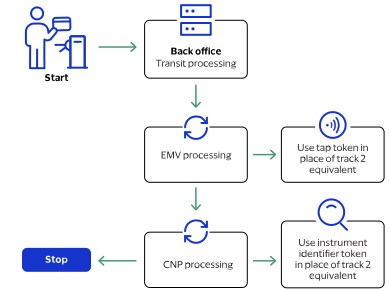
In card-present EMV contactless requests, include the transient token ID in the
tokenInformation.jti
field in place of track 2 data.
When submitting a tap token creation request, you can include EMV tag-length-value (TLV)
tags in the
paymentInformation.fluidData.value
field or as part of
the payment transaction request within the
pointOfSaleInformation.emv.tags
field.
If you send EMV tags in the tap token create request, do not send EMV tags in the
payment transaction request.
When EMV TLV tags are present in both the payment transaction and the token vault,
Visa Acceptance Solutions
reads the value provided in the payment transaction
rather than the values stored in the vault.
Mastercard EMV transactions include these three field values, which can be handled automatically:
paymentInformation.card.initiationChannel
pointOfSaleInformation.emv.cardSequenceNumber
pointOfSaleInformation.serviceCode
Your account can be configured to read these values automatically from the EMV TLV
tags and track 2 equivalent. When that option is enabled, do not include those three
fields in EMV payment requests.
If any of these values are present in both the separate fields and the EMV
TLV and track 2 equivalent,
Visa Acceptance Solutions
reads the value provided in the
separate fields rather than the values present in the EMV TLV and track 2
equivalent.
Figure:
Payment Processing with a Token Workflow
Mastercard Authorization with a Token
Use this information to process an authorization with a token.
Endpoint
Test:
POST
https://apitest.visaacceptance.com
/pts/v2/payments
Production:
POST
https://api.visaacceptance.com
/pts/v2/payments
Required Fields for a Mastercard Authorization with a Token
Use this information to process a Visa deferred sale.
A sale transaction combines an authorization and capture. At the end of the travel
period, request a Visa deferred sale with a token for an aggregated payment.
Endpoint
Test:
POST
https://apitest.visaacceptance.com
/pts/v2/payments
Production:
POST
https://api.visaacceptance.com
/pts/v2/payments
Required Fields for a Visa Deferred Sale with a Token
Tap-Initiated Authorization for Debt Recovery with a Token
Use this information to process a tap-initiated authorization for debt recovery with a
token.
When a cardholder attempts to use a blocked card at the transit reader, create a fresh
debt recovery authorization request using the chip data from the new tap, along with the
fare amount of the previous declined authorization.
Endpoint
Test:
POST
https://apitest.visaacceptance.com
/pts/v2/payments
Production:
POST
https://api.visaacceptance.com
/pts/v2/payments
Required Fields for a Tap-Initiated Authorization for Debt Recovery with a Token
Use this information to process a tap-initiated sale for debt recovery with a token.
A sale transaction combines an authorization and capture. When a cardholder attempts to
use a blocked card at the transit reader, create a fresh debt recovery sale request
using the chip data from the new tap, along with the fare amount of the previous
declined authorization.
Endpoint
Test:
POST
https://apitest.visaacceptance.com
/pts/v2/payments
Production:
POST
https://api.visaacceptance.com
/pts/v2/payments
Required Fields for a Tap-Initiated Sale for Debt Recovery with a Token
When a transaction is below the threshold for First Ride Risk protection, use the capture
service to capture funds from a declined authorization. For more information, see First Ride Risk.
Endpoint
Production:
POST
https://api.visaacceptance.com
/pts/v2/payments/
{id}
/captures
Test:
POST
https://apitest.visaacceptance.com
/pts/v2/payments/
{id}
/captures
The
{id}
is the transaction ID
returned in the authorization response.
{
  "id": "6502857670496139204005",
  "submitTimeUtc": "2022-04-18T12:42:47Z",
  "status": "INVALID_REQUEST",
  "reason": "INVALID_DATA",
  "message": "Declined - One or more fields in the request contains invalid data"
}
Stand-Alone Credit with a Token
Use this information to process a stand-alone credit with a token.
A
stand-alone credit
is a credit that is not linked to a previous transaction.
When you process a stand-alone credit, there is no set limit on the amount because there
is no reference to the original transaction amount. There is no time limit for
requesting a stand-alone credit.
IMPORTANT
Restrict access to the stand-alone credit service and do not make it
available directly on your customer-facing interface. Instead, include the feature in
your internal customer-service process to prevent misuse and make sure all requests are
reviewed.
When a stand-alone credit request is successful, the issuing bank for the payment card
takes money out of the merchant bank account and returns it to the customer. It
typically takes two to four days for the acquiring bank to transfer funds from the
merchant bank account.
Endpoint
Production:
POST
https://api.visaacceptance.com
/pts/v2/credits/
Test:
POST
https://apitest.visaacceptance.com
/pts/v2/credits/
Required Fields for a Stand-Alone Credit with a Token
Use this information to void an authorization, capture, refund, or credit when you do not
receive a response within the time allowed and the transaction times out. Include a
unique value in the
clientReferenceInformation.transactionId
field in
your initial request and use the same unique value for the
{
  "id": "6502858209346457804004",
  "submitTimeUtc": "2022-04-18T12:43:41Z",
  "status": "INVALID_REQUEST",
  "reason": "INVALID_DATA",
  "message": "Declined - One or more fields in the request contains invalid data"
}
Mass Transit Token Management Services
Use the
Token Management Service
to create, retrieve, and delete tokens for mass
transit.
Creating a Token
Use this information to create tokens directly from the validator or through your back
office system.
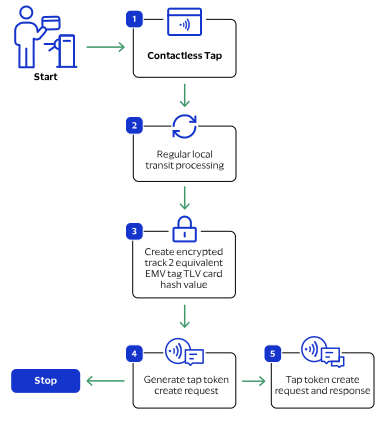
When the customer taps their card, the validator generates a unique transaction
identifier that is used to create these tokens:
Transient token: tokenized EMV tag data and track2 data. Used as the transaction
ID to create the instrument identifier and payment instrument tokens, and as the
payment token for the final authorization and sale transactions. You can delete
this token after a success transit payment for the travel period.
Visa Acceptance Solutions
stores this token for 7 days.
Instrument identifier: tokenized card number, used for follow-on payment
transactions and BIN lookup.
Payment instrument: stores the card hash that is used to identify the payment
card in the deny list.
Figure:
Creating a Token Workflow
The token creation process begins when the when the cardholder taps a payment card at the
fare collection terminal.
{
    "_links": {
        "paymentInstruments": {
            "href": "https://apitest.cybersource.com/tms/v1/instrumentidentifiers/CD776F4472D6AC69E053AF598E0A30F3/paymentinstruments"
        }
    },
    "errors": [
        {
            "type": "instrumentIdentifierDeletionError",
            "message": "Action cannot be performed as the InstrumentIdentifier is associated with one or more PaymentInstruments"
        }
    ]
}