- Customer Tokens
- Payment Passkey
- Classic Cloud Token Framework
On This Page
FILTER BY TAG
Device Binding Workflow
Figure:
Bind a Device
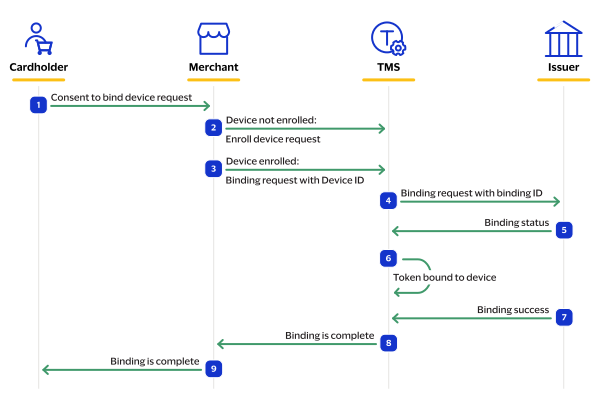
- The customer sends a request to the merchant that they consent to bind the device.
- If the device is not enrolled, the merchant sends a request toTMSto enroll the device.
- Test:POSThttps://apitest.visaacceptance.com/tms/v2/devices
- If the device is enrolled, the merchant sends a request toTMSto bind the device using the device ID.
- Test:POSThttps://apitest.visaacceptance.com/tms/v2/tokenized-cards/{id}/bindings
- TMSsends a binding request to the issuer with the binding ID.
- The issuer sends a response toTMSwith the binding status.
- If authentication is valid,TMSbinds the token to the device.
- The issuer notifiesTMSthat binding was successful.
- TMSsends a response to the merchant that the binding is completed.
- The merchant notifies the customer that their device binding is complete.