On This Page
Pay by Link Acquirer Implementation Guide
Pay by Link
Acquirer Implementation GuideThis section describes how to use this guide and where to find further information.
Audience and Purpose
This guide is written for
Visa Acceptance Solutions
partners want to enable Pay by Link
payment processing for their transacting merchants. Conventions
This statement appears in this document:
An
Important
statement contains information essential to
successfully completing a task or learning a concept.Customer Support
For support information about any service, visit the Support Center:
Pilot Release
This document provides information about the pilot release of the
Pay by Link
acquirer implementation.Recent Revisions to This Document
25.09.01
This revision contains only editorial changes and no technical updates.
25.08.01
Pilot release.
VISA Platform Connect: Specifications and Conditions for
Resellers/Partners
The following are specifications and conditions that apply to a Reseller/Partner enabling
its merchants through
Visa Acceptance platform
. Failure to meet any of the specifications and conditions below is
subject to the liability provisions and indemnification obligations under
Reseller/Partner’s contract with Visa/Cybersource.- Before boarding merchants for payment processing on a VPC acquirer’s connection, Reseller/Partner and the VPC acquirer must have a contract or other legal agreement that permits Reseller/Partner to enable its merchants to process payments with the acquirer through the dedicated VPC connection and/or traditional connection with such VPC acquirer.
- Reseller/Partner is responsible for boarding and enabling its merchants in accordance with the terms of the contract or other legal agreement with the relevant VPC acquirer.
- Reseller/Partner acknowledges and agrees that all considerations and fees associated with chargebacks, interchange downgrades, settlement issues, funding delays, and other processing related activities are strictly between Reseller and the relevant VPC acquirer.
- Reseller/Partner acknowledges and agrees that the relevant VPC acquirer is responsible for payment processing issues, including but not limited to, transaction declines by network/issuer, decline rates, and interchange qualification, as may be agreed to or outlined in the contract or other legal agreement between Reseller/Partner and such VPC acquirer.
DISCLAIMER: NEITHER VISA NOR CYBERSOURCE WILL BE RESPONSIBLE OR LIABLE FOR ANY ERRORS OR
OMISSIONS BY THE
Visa Platform Connect
ACQUIRER IN PROCESSING TRANSACTIONS. NEITHER VISA
NOR CYBERSOURCE WILL BE RESPONSIBLE OR LIABLE FOR RESELLER/PARTNER BOARDING MERCHANTS OR
ENABLING MERCHANT PROCESSING IN VIOLATION OF THE TERMS AND CONDITIONS IMPOSED BY THE
RELEVANT Visa Platform Connect
ACQUIRER. Introduction to Pay by Link Acquirer
Implementation
Digital Acceptance Applications offer seamless and secure methods for online payment
collection, catering to diverse merchant needs. These applications include:
- Recurring Billing:A simple and flexible way to manage subscription and recurring payments to drive revenue growth and minimize churn.
- Invoicing:Save time and get paid faster by allowing your customers to securely pay using their preferred payment method from any connected device.
- An easy and fast way to sell products or receive donations using payment links, checkout buttons, or QR codes without any coding.Pay by Link:
- Virtual Terminal:Secure payment terminal that uses your computer without requiring a card reader or other expensive hardware.
This comprehensive guide explains how you, as a partner or reseller, can integrate to
Pay by Link
and resell the Pay by Link
solution
to your merchants.How to Sell Pay by Link
Pay by Link
Pay by Link
is a versatile payment solution that enables your
merchants to accept online payments without the need for an e-commerce website.
Merchants can easily sell goods and services or collect donations by generating
secure payment links, QR codes, and checkout buttons to share with their customers. This is ideal for small businesses, micro-merchants, and non-profits that want to
accept donations or payments for fixed-price items.
Pay by Link
provides APIs and webhook notifications that enable
system integrators and enterprise merchants to create embedded payment solutions. By
using Pay by Link
as a hosted payment page, they can:- Offload PCI compliance.
- Enable various payment methods, such as wallets and regional solutions.
- Ensure robust security.
This enables businesses to focus on growing their operations instead of managing
complex payment systems.
Benefits for Merchants
- Ease of Use:Merchants can quickly generate payment links and share them with customers by email, SMS, or social media, with no integration effort required
- Increased Sales:By offering customers to pay with their preferred payment methods and providing a seamless payment experience, merchants can attract more customers and increase sales.
- Security:Pay by Linkensures secure transactions, protecting both merchants and customers from fraud, with pre-integrated fraud and risk management tools.
- Flexibility:Merchants can create fixed-price links, QR codes, and checkout buttons, enabling them to reach their customers across various channels
- No Need for an eCommerce Website:Merchants can accept online payments without the need to set up and maintain an e-commerce website.
Benefits for Resellers
- Additional Revenue Stream:Resellers can offerPay by Linkas an additional service to their merchants, generating more revenue.
- Enhanced Customer Relationships:By providing a valuable payment solution, resellers can strengthen their relationships with merchants.
- Competitive Advantage:OfferingPay by Linkcan differentiate resellers from competitors, making them more attractive to potential clients.
- Ease of Implementation:The straightforward setup process enables resellers to quickly enablePay by Linkfor their merchants.
Choosing Pay by Link or Invoicing
Pay by Link
or InvoicingPay by Link
is best for quick and easy payments from multiple customers
without detailed customer information. Invoicing is ideal for sending detailed itemized
bills to specific customers regularly and tracking payments. Feature | Invoicing | Pay by Link |
|---|---|---|
Purpose
| Send itemized bills to specific customers. | Generate payment links for multiple customers. |
Customer Information
| Requires known customer details. | Used to collect payments from multiple unknown customers using the
same link. |
Payment Link
| Included in the system generated invoice email or can be embedded in
the customer notifications. | Standalone link, QR code, or checkout button for merchants to
distribute. |
Discounts and Taxes
| Supported at the line item and invoice level. | Not supported. |
Usage
| One-time payments (supports partial payments). | One-time or reusable links for donations or fixed-price
items. |
Expiry
| Link expires after the invoice is fully paid. | Link can be used repeatedly until deactivated by the
merchant. |
Email Notifications
| Emails to merchants and payers when a payment is successful with a
link to the receipt. Automated email reminders. | Emails to merchants and payers when a payment is successful with a
link to the receipt. |
Webhooks
| Webhooks triggered when an invoice is partially or fully paid. | Webhooks triggered when a payment is successful. |
Similarities Between Invoicing and Pay by Link
Pay by Link
Both Invoicing and
Pay by Link
support multiple currencies, mobile
friendly payment pages, and all payment methods supported by Unified Checkout, such
as debit cards, credit cards, Apple Pay, Google Pay, Click to Pay, echeck in the US
and CA, and more. This support enables merchants to customize the information that
is collected during checkout. Invoicing and
Pay by Link
are integrated with fraud and risk management
tools and support 3DS payer authentication to ensure secure payments and help
merchants reduce the risk of chargebacks.Best Practices for Pay by Link
Pay by Link
- DoUsePay by Link
- For one-time sale or donation payments from multiple customers to ensure a seamless transaction experience.
- To create one-time sales offers or test new sales channels.
- For remote transactions where traditional payment methods may not be feasible, such as selling internationally or through social media.
- To offer a quick and secure payment option for your customers.
- Embedded in an email or SMS using the payment link or QR code.
- Do NotUsePay by Link
- For recurring payments try Recurring Billing instead.Pay by Linkis designed for single transactions.
- For payments that require discounts and taxes to be displayed to the payer before the payment.
- If there are security concerns that the payment link is being intercepted by unauthorized parties.
- For transactions that need extensive customization and data capture that cannot be accommodated in thePay by Linksetup.
How to Enable Pay by Link as a Reseller Portfolio User
Pay by Link
as a Reseller Portfolio UserPay by Link
is an enablement only product, and when enabled for a
merchant, it does not require any additional configuration. To enable
Pay by Link
, you can use the API or the Business Center
.Prerequisites to Enable Pay by Link
Pay by Link
Before you can enable
Pay by Link
, merchants must complete these
prerequisites: - Merchant Account:Active merchant account with Visa Acceptance or Cybersource.
- Unified Checkout:Unified Checkout enabled for streamlined payment processes.
- Card Payments are enabled by default for Unified Checkout.
- Digital Wallets and Alternate Payment Methods can be made available by enablement by the merchant or enabled on behalf of the merchant.
- Fraud and Risk Security:Enable fraud and risk management tools and 3DS Payer Authentication, which is required in some regions, for secure transactions.
Merchants must comply with regulations related to capturing
customer consent to use payment information gathered using
Pay by Link
for merchant-initiated transactions.Enabling Pay by Link for New Merchants in the Business Center
Pay by Link
for New Merchants in the Business Center
- Add a new merchant:Begin by adding the new merchant to the system. Ensure all required details are correctly provided.
- Select boarding type:Choose the appropriate boarding type based on the merchant's requirements.
- Complete merchant information form:Complete the merchant information form with all of the relevant details.
- Enable Unified Checkout:Activate Unified Checkout to streamline the payment process.
- ActivateEnablePay by Link:Pay by Linkto allow the merchant to start generating payment links.
To add
Pay by Link
to a boarding package,
work with your account manager.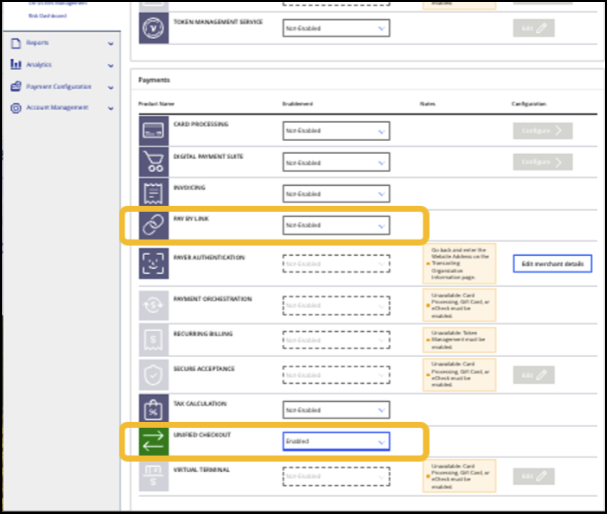
Enabling Pay by Link for Existing Merchants in the Business Center
Pay by Link
for Existing Merchants in the Business Center
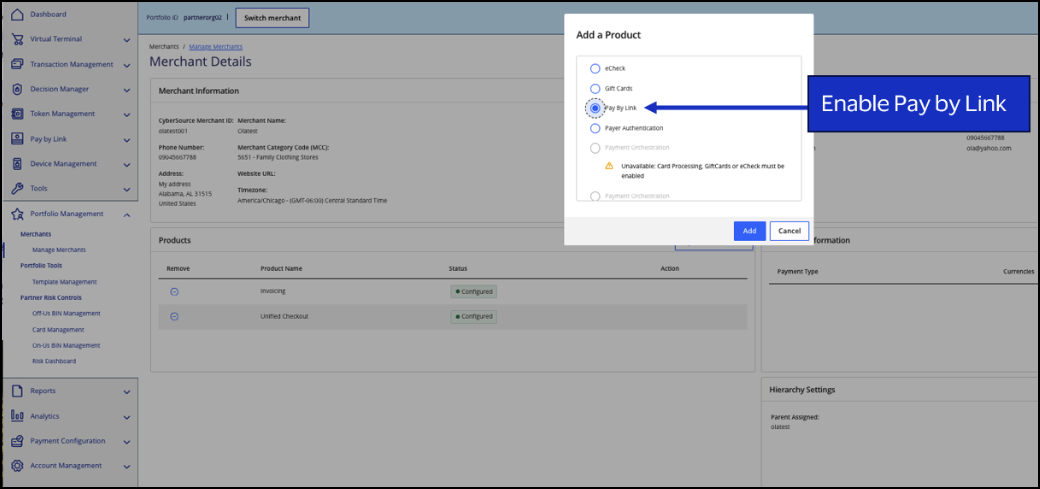
- Search for an existing merchant:Locate the merchant in the system using the search function.
- View merchant’s profile:Access the merchant's profile to review their current setup.
- Enable Unified Checkout:Activate Unified Checkout if it is not already enabled.
- ActivateEnablePay by Link:Pay by Linkto allow the merchant to generate and share payment links.
Enabling Pay by Link for Merchants Using the Boarding API
Pay by Link
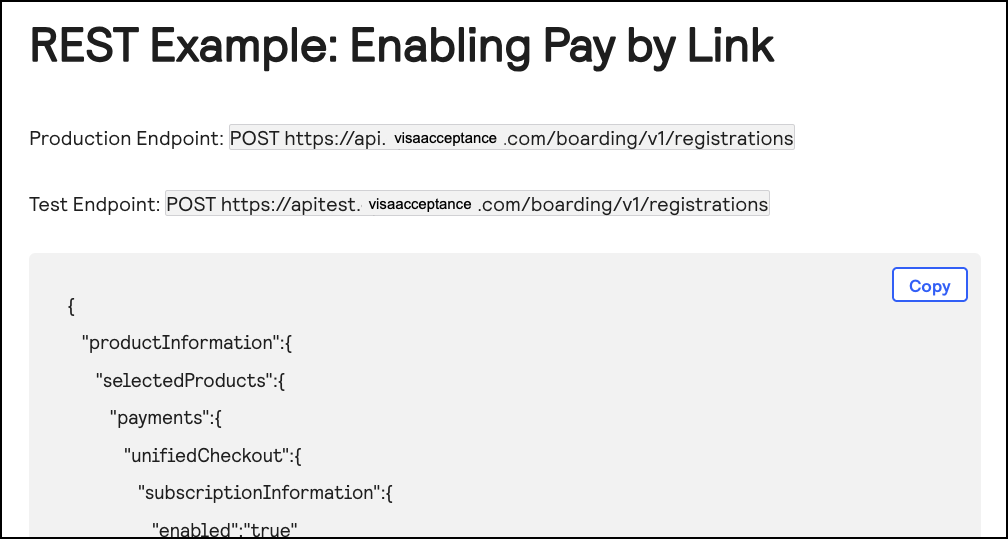
for Merchants Using the Boarding APIUse the Boarding API to enable Unified Checkout and activate
Pay by Link
. For more information, see the Pay by Link
section in the
Merchant Boarding User Guide for the REST API
. 
How to Integrate with Pay by Link
Pay by Link
This section describes how you can integrate with
Pay by Link
as a
partner using your portfolio account or supporting your merchants who are integrating to
the API.Creating and Sharing Payment Links
Merchants can create fixed-price or customer-set price links using
Pay by Link
APIs.
These links can be sent via email, SMS, or any other communication channel. This
flexibility allows merchants to reach their customers wherever they are and
facilitate quick and easy payments. See Create a Fixed-Price Link
and Create a Customer-Set Link
specifications in the .
Pay by Link
Developer Guide for the REST APIReceive Payment Notifications from Webhook Subscriptions
Merchants can receive real-time updates on payment statuses by subscribing to webhook
notifications. This ensures that merchants stay informed when payments are received
and can provide timely responses to their customers. For more information about how
to subscribe to webhooks notifications, see the
Webhooks Implementation Guide
for the REST API
.Authenticate Pay by Link API Requests
Pay by Link
API RequestsPay by Link
APIs can be authenticated using REST API keys, meta keys, or OAuth.- OAuth
- Use OAuth authentication when a connector, such as a plugin or add-in, needs to connect to thePay by LinkAPIs. This displays a login screen and a screen that enables the user to grant permission to accessPay by LinkAPIs.
- REST API keys
- If you want your system to sendPay by LinkAPI requests and still control your user interface, the REST API keys can be used. For more information about how to create a REST API key, see REST API Key with a P12 File in theCreating and Using Security Keys User Guide.
- Meta keys
- If you are boarding merchants and need to sendPay by LinkAPI requests on behalf of several merchants, then you can use a type of REST APImetakey that enables your portfolio account to send API requests for all transacting MIDs in the portfolio. For more information about how to create and manage meta keys, see the Meta Key Creation and Management section in theCreating and Using Security Keys User Guide.
Best Practices for Using Payment Links in Different Channels
Adjust payment link formats based on the distribution channel, such as social media,
email, and SMS, to significantly enhance your payment process and customer experience.
Here are some best practices for each channel:
- Email
- Clear Call-to-Action:Use prominent buttons or links with clear instructions to guide your customers to the payment page
- Personalization:Tailor the email content to the recipient, including personalized messages and relevant payment details.
- Security:Ensure the email is sent from a recognizable and trusted address to avoid phishing concerns.
- Text (SMS)
- Concise Messaging:Keep the message short and to the point. Include only essential information and the payment link. Messages can contain a maximum of 160 characters. Shorten the payment link appropriately using tools like TinyURL to condense your message.
- Single Link:Use one link for each message to avoid confusion and improve click-through rates.
- Verification:Send the payment request from a verifiable business phone number to build trust.
- Social Media
- Engaging Content:Integrate payment links in engaging posts or stories to capture attention.
- Consistency:Ensure the payment link matches the branding and tone of your social media profile.
- Track Performance:Use analytics to monitor the effectiveness of payment links and optimize accordingly.
- Digital Marketing
- Seamless Integration:Embed payment links in digital ads, landing pages, and email campaigns for a seemless user experience.
- Clear Call to Action:Embed payment links in clear calls to action for accessibility.
- Physical Advertisements
- QR Codes:Use QR codes on flyers, posters, and billboards to direct customers to the payment page.
- Clear Instructions:Provide clear instructions on how to use the QR code or payment link.
- Visibility:Ensure the payment link or QR code is prominently displayed and easy to scan.
By following these best practices, you can enhance the efficiency and security of your
payment processes across different channels.
Support Merchants for Pay by Link
Pay by Link
This section describes the different methods you can use to support your merchants who
use Pay by Link.
Use Merchant Switch to Assist Merchants
Merchant Switch is a powerful feature that enables partners to support their merchants
more effectively.
By using Merchant Switch, partners can switch their view to any organization in their
portfolio, gaining visibility and access to the merchant's configurations and settings.
This enables partners to assist merchants with operating their controls, troubleshooting
concerns, and managing their use of
Pay by Link
. To utilize Merchant Switch, follow these steps:
- Log into EBC with a portfolio-level account:Ensure you have the necessary permissions to access the Merchant Switch feature.
- SelectThis option will be available at the top of the page.Switch View:
- Choose Organization:Use theQuickorCustomsearch options to find the merchant you want to switch into.
- Switch View:When you find the merchant, clickSwitch Viewto switch to their account. You can view and interact with the merchant's settings and configurations as if you were logged in as the merchant
Set Merchant User Roles and Permissions for Pay by Link
Pay by Link
Pay by Link
supports two permission levels to ensure secure and appropriate access: - This read-only permission enables users to view payment links without making any changes. It is ideal for customer support staff who need to assist merchants without the risk of altering any settings.Pay by LinkView:
- This permission enables users to create and edit payment links. It is suitable for administrators and other users who need full control over the payment link creation and management process.Pay by LinkManagement:
Pay by Link with Fraud and Risk Management
Pay by Link
with Fraud and Risk Management Pay by Link
integrates seamlessly with Decision Manager and Fraud Management Essentials,
to provide robust security and fraud prevention. By integrating these tools, merchants
can ensure that their transactions are secure and that they are protected from fraud,
while still providing a seamless payment experience for their customers.Pay by Link with Transaction Management and Reporting
Pay by Link
with Transaction Management and Reporting Pay by Link
transactions are fully integrated with transaction management and reporting
tools, providing merchants with comprehensive visibility and control over their payment
activities. - Transaction Management:Pay by Linkpayments are searchable using the transaction management module in theBusiness Center.Pay by Linktransactions have the Merchant Reference Number set to the LinkID and the Client Application set to PaybyLink. Merchants can easily locate and review transactions using various filters, such as date range, transaction status, and payment method.
- Reporting:Detailed reports forPay by Linkpayments can be generated using the reporting module in theBusiness Center. Merchants can create custom reports to track payment link performance, monitor transaction statuses, and analyze payment trends using the connection method to filterPay by Linktransactions. These reports can be scheduled for automatic generation and delivery, ensuring that merchants have up-to-date information at their fingertips.
By leveraging these transaction management and reporting capabilities, merchants can gain
valuable insights into their payment activities, streamline their operations, and make
informed business decisions.
Branding the Pay by Link Payment Page
Pay by Link
Payment Page Merchants can customize the
Pay by Link
payment page to reflect their
brand identity. This includes adding logos and their brand color to create a cohesive
and professional appearance. To configure the payment page:
- Log into theAccess theBusiness Center:Pay by Linksettings.
- Navigate to Branding:Here, merchants can upload their logo and choose brand colors to match their brand guidelines.
- Preview and Save Changes:Merchants can preview the changes before saving to ensure the payment page accurately represents their brand.
By personalizing the payment page to match the merchant's brand, they can create trust
with their customers to ensure faster payments.