On This Page
Response Statuses for a Sale Workflow
This workflow shows the statuses that can occur at each stage of the payment process.
Figure:
Sale Payment Statuses
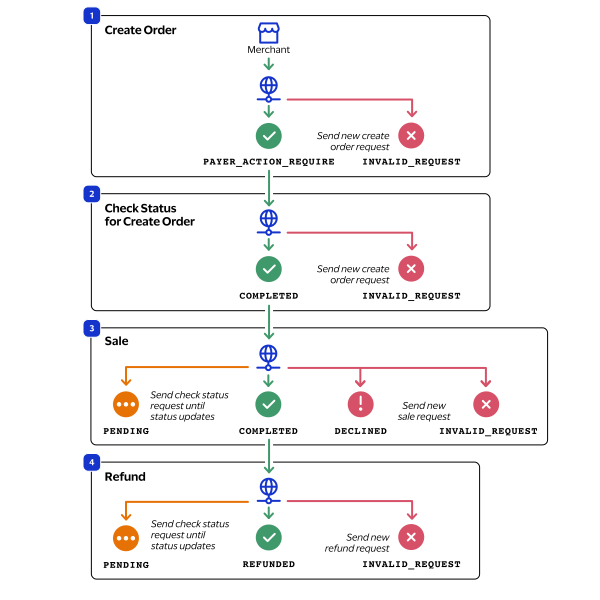
- You request a create order and receive one of these possible statuses:
- PAYER_ACTION_REQUIRE: The request was successful, and you must redirect the customer to the PayPal checkout URL in order for the customer to approve the payment.
- INVALID_REQUEST: The request was not successful. Send a new request.
- You request a check status for the created order and receive one of these possible statuses:
- COMPLETED: The order was approved by the customer. This status can also occur when the order is successfully used for an authorization or sale.
- INVALID_REQUEST: The request was not successful. Send a new request.
- You request a sale toCybersourceand receive one of these possible statuses:
- COMPLETED: The sale successfully processed, and the payment is complete.
- DECLINED: The sale request is declined. Send a new sale request.
- INVALID_REQUEST: The sale request is not successful. Send a new sale request.
- PENDING: The sale request is successful and is being reviewed by PayPal. Use the check status request as often as necessary until the status updates.
- If the customer returns a purchase, you request a refund and receive one of these possible statuses:
- PENDING: The refund request was successful and is being reviewed by PayPal. Use the check status request as often as necessary until the status updates.
- REFUNDED: The captured funds were successfully refunded to the customer's account. This status can also occur during a customer dispute, such as a chargeback or reversal.
- INVALID_REQUEST: The refund request was not successful. Send a new refund request.