On This Page
Creating and Updating an Order Workflow
This workflow illustrates the process of creating and updating an order.
Figure:
Creating and Updating an Order Workflow
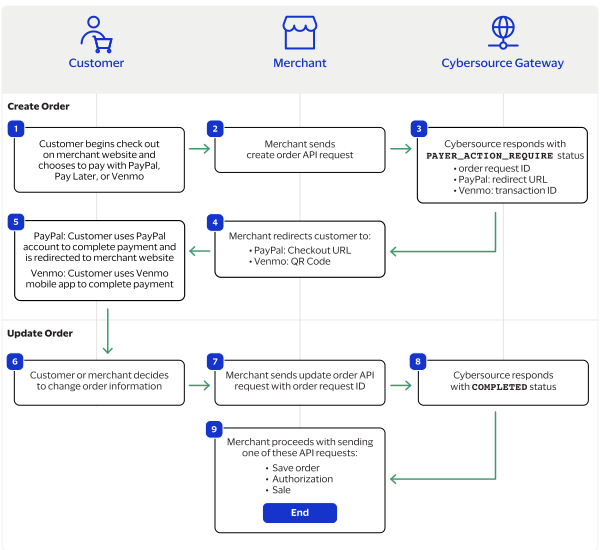
- The customer begins to check out on the merchant's website and chooses one of these payment methods:
- PayPal
- PayPal Pay Later
- Venmo
- You request a create order. For more information, see Create a PayPal Order.
- Cybersourceresponds with this information in the response message:
- PAYER_ACTION_REQUIREDstatus
- PayPal checkout redirect URL or a Venmo checkout QR code
- Order ID
- Order request ID
- You redirect the customer to the PayPal checkout URL or display the Venmo QR code. The Venmo QR code is generated by setting the transaction ID in the Venmo Java SDK.
- The customer uses their PayPal or Venmo account to complete the payment and is redirected to the merchant's checkout page.
- The customer or merchant decides to change order information, such as the payment amount.IMPORTANTYou cannot update an order after an authorization or sale is complete.
- You request an update order. For more information, see Update an Order.
- Cybersourceresponds with aCOMPLETEDstatus.
- The merchant can send a follow-on request discussed in one of these topics: