On This Page
Order Management Statuses Workflow
This workflow shows the statuses that can occur at each stage of creating and managing an
order.
You can send a check status request after every request in this workflow to verify the
status response.
Figure:
Order Management Statuses
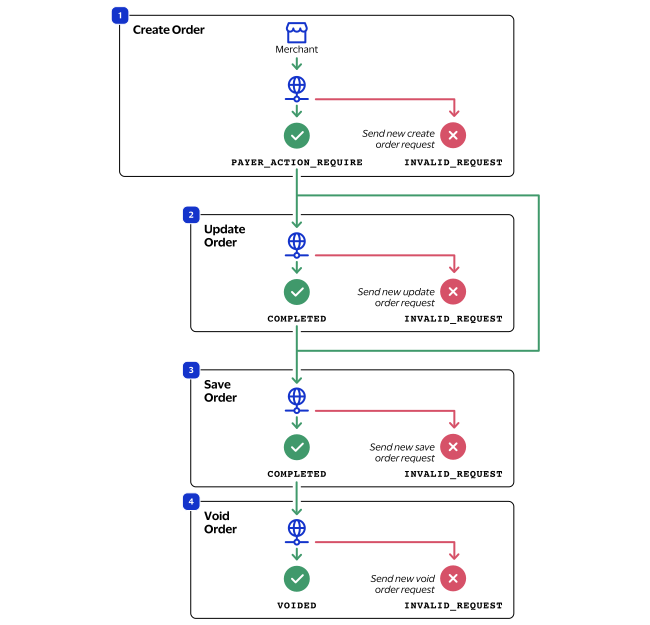
- You request a create order and receive one of these possible statuses:
- PAYER_ACTION_REQUIRE: The request was successful, and you must redirect the customer to the PayPal checkout URL in order for the customer to approve the payment.
- INVALID_REQUEST: The request was not successful. Send a new request.
- If the customer changes their purchase, you request an update order and receive one of these possible statuses:
- COMPLETED: The request was successful and the order information is updated.
- INVALID_REQUEST: The request was not successful. Send a new update order request.
- If the customer consents to future purchases on PayPal or Venmo checkout page, you request a save order and receive one of these possible statuses:
- COMPLETED: The request was successful and the customer's payment information from the order is saved for future transactions.
- INVALID_REQUEST: The request was not successful. Send a new save order request.
- If the customer notifies you to delete the customer's saved payment credentials, you request a void order and receive one of these possible statuses:
- VOIDED: The request was successful and the customer's payment credentials are no longer saved.
- INVALID_REQUEST: The request was not successful. Send a new request.