On This Page
Setting Up the PAX Terminal
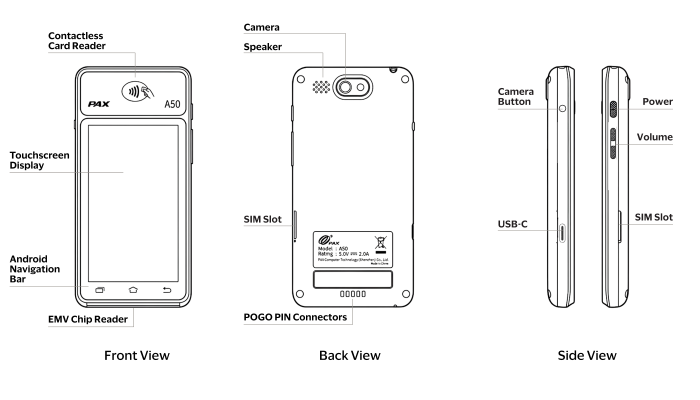
This section describes how to set up the terminal. The product drawings show the PAX
device features.
Figure:
PAX A50 Terminal Drawings with Features Labeled
Charge the PAX Terminal Battery
Have the
connector cable and power supply unit provided with the terminal available.
Follow these steps to charge the PAX terminal battery.
- Connect theUSB-C cableto the USB cable port on the PAX terminal.
- Plug the power supply unit into an electrical outlet. The terminal screen shows the charging status.
Power the PAX Terminal
Before you can power on the terminal, you must charge the battery.
Follow these steps to power the PAX terminal on and off.
- To power on the terminal, press and hold thePowerbutton for 3 seconds until the device emits a beeping sound, and the LED next to the IC card slot lights. This light indicates that the terminal is powering on.
- To power off the terminal, press and hold thePowerbutton for 3 seconds until the Shutdown menu appears on the terminal screen.
- TapTurn Off. A message appears, confirming that the terminal is being powered off.