On This Page
PHP API for the Client
Summary of Functions
The client includes these functions:
cybs_load_config()
Syntax | array cybs_load_config(
string filename ) |
Description | Loads the configuration settings
from a file |
Returns | An array containing the
configuration settings |
Parameters | filename : Name of
the configuration file |
cybs_run_transaction()
Syntax | int
cybs_run_transaction( array config, array request, array reply
) | |
Description | Sends the request to the
Cybersource server and receives the reply | |
Returns | A value that indicates
the status of the request | |
Parameters | config :
Configuration array to use | |
request :
Array containing one of these: |
| |
reply :
Array containing one of these: | You must create this array before you call cybs_run_transaction().
| |
Reply Key Descriptions
- CYBS_SK_ERROR_INFO: Information about the error that occurred
- CYBS_SK_RAW_REPLY: The server’s raw reply
- CYBS_SK_FAULT_DOCUMENT: The entire, unparsed fault document
- CYBS_SK_FAULT_CODE: The fault code, which indicates where the fault originated
- CYBS_SK_FAULT_STRING: The fault string, which describes the fault
- CYBS_SK_FAULT_REQUEST_ID: The request ID for the request
Possible Return Status Values
The cybs_run_transaction() function returns a status indicating the result of the request.
Possible Status Values describes the
possible status values, including whether the error is critical. If an error occurs after
the request has been sent to the server, but the client cannot determine whether the
transaction was successful, then the error is considered critical. If a critical error
happens, the transaction may be complete in the
Cybersource
system but not
complete in your order system. The descriptions below indicate how to handle critical
errors.The sample scripts display a numeric value for the return status, which is listed in the first column.
Numeric Value (for Sample
Scripts) | Value | Description |
|---|---|---|
0 | CYBS_S_OK | Critical: NoResult:
The client successfully received a reply.For name-value pair users,
the $reply array has the reply name-value pairs for the
services that you requested.For XML users, the
$reply array contains the response in XML
format.Manual action to take: None |
-1 | CYBS_S_PHP_PARAM_ERROR | Critical: NoResult:
The request was not sent because there was a problem with one or more of the
parameters passed to the cybs_run_transaction() function.Manual
action to take: Make sure the parameter values are
correct. |
1 | CYBS_S_PRE_SEND_ERROR | Critical: NoResult:
An error occurred before the request could be sent. This usually indicates a
configuration problem with the client.Error information to
read: $reply[CYBS_SK_ERROR_INFO] Manual
action to take: Fix the problem described in the error
information. |
2 | CYBS_S_SEND_ERROR | Critical: NoResult:
An error occurred while sending the request.Error information to
read: $reply[CYBS_SK_ERROR_INFO] Manual
action to take: NoneA typical send error that
you might receive when testing occurs if the ca-bundle.crt
file is not located in the same directory as your security key. For
information about how to fix the problem, see the description of the
configuration parameter sslCertFile. |
3 | CYBS_S_RECEIVE_ERROR | Critical:
YesResult: An error occurred while waiting for or retrieving
the reply.Error information to
read: $reply[CYBS_SK_ERROR_INFO] $reply[CYBS_SK_RAW_REPLY] Manual
action to take: Check the Transaction Search screens on the Business
Center to verify that the request was processed, and if so, whether it
succeeded. Update your transaction database appropriately. |
4 | CYBS_S_POST_RECEIVE_ERROR | Critical:
YesResult: The client received a reply or a fault, but an error
occurred while processing it.Error information to
read: $reply[CYBS_SK_ERROR_INFO] $reply[CYBS_SK_RAW_REPLY] Manual
action to take: Examine the value of
$reply[CYBS_SK_RAW_REPLY] . If you cannot determine the
status of the request, then check the Transaction Search screens on the
Business Center to verify that the request was processed, and if
so, whether it succeeded. Update your transaction database
appropriately. |
5 | CYBS_S_CRITICAL_SERVER_FAULT | Critical:
YesResult: The server returned a fault with
$reply[CYBS_SK_FAULT_CODE] set to
CriticalServerError.Error information to
read: $reply[CYBS_SK_ERROR_INFO] $reply[CYBS_SK_FAULT_CODE] $reply[CYBS_SK_FAULT_STRING] $reply[CYBS_SK_FAULT_DOCUMENT] $reply[CYBS_SK_FAULT_REQUEST_ID] Manual
action to take: Check the Transaction Search screens on the Business
Center to verify that the request succeeded. When searching for the request,
use the request ID provided by
$reply[CYBS_SK_FAULT_REQUEST_ID] . |
6 | CYBS_S_SERVER_FAULT | Critical: NoResult:
The server returned a fault with $reply[CYBS_SK_FAULT_CODE] set to
ServerError, indicating a problem with the Cybersource
server.Error information to
read: $reply[CYBS_SK_ERROR_INFO] $reply[CYBS_SK_FAULT_CODE] $reply[CYBS_SK_FAULT_STRING] $reply[CYBS_SK_FAULT_DOCUMENT] Manual
action to take: None |
7 | CYBS_S_OTHER_FAULT | Critical: NoResult:
The server returned a fault with $reply[CYBS_SK_FAULT_CODE] set to a value
other than ServerError or CriticalServerError. Indicates a possible problem
with merchant status or the security key. Could also indicate that the
message was tampered with after it was signed and before it reached the
Cybersource server.Error information to
read: $reply[CYBS_SK_ERROR_INFO] $reply[CYBS_SK_FAULT_CODE] $reply[CYBS_SK_FAULT_STRING] $reply[CYBS_SK_FAULT_DOCUMENT] Manual
action to take: Examine the value of the
$reply[CYBS_SK_FAULT_STRING] and fix the problem. You
might need to generate a new security key, or you might need to contact
Customer Support if there are problems with your merchant status.A typical error that you might receive occurs if your merchant
ID is configured for “test” mode but you send transactions to
the production server. For information about fixing the problem, see the
description of the configuration parameter sendToProduction. |
8 | CYBS_S_HTTP_ERROR | Critical: NoResult:
The server returned an HTTP status code other than 200 (OK) or 504 (gateway
timeout). Note that if a 504 gateway timeout occurs, then the
status=3 .Error information to
read: $reply[CYBS_SK_ERROR_INFO] $reply[CYBS_SK_RAW_REPLY] Value
of varReply:
CYBS_SK_RAW_REPLY contains the HTTP response body, or if
none was returned, the literal "(no response
available)" .Manual action to take: None. |
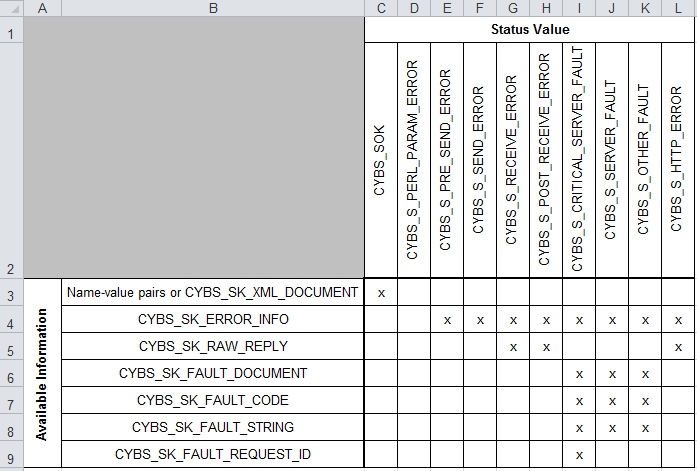
The following table summarizes which reply information you receive for each status
value.
Figure:
Reply Information Available for Each Status Value