On This Page
C/C++ API for the Client
CybsMap Structure
CybsMap is the structure that contains your configuration settings, your request, and the reply. You use the functions described in the next section to manipulate the structure, which includes adding the configuration settings, adding either name-value pairs or an XML document for the request, sending the request, and retrieving the corresponding reply.
Available Functions
The client API includes the functions described in the following sections.
cybs_load_config()
Syntax | CybsMap *cybs_load_config(
const char *szFilename ) |
Description | Creates an empty CybsMap structure
and loads the configuration settings into the structure from a file. If you
include a configuration property in the file more than once, the behavior is
undefined. The add behavior setting (see cybs_set_add_behavior()) of the
returned map is set to 2 (overwrite). This allows you to use the cybs_add()
function (cybs_add()) to immediately
override any settings that were read from the configuration file.You must
later free the returned pointer by using cybs_destroy_map() (see cybs_destroy_map(),). |
Returns | Returns a pointer to the CybsMap
structure containing the configuration settings. |
Parameters | szFilename : Name of
the configuration file with the full or relative path. |
cybs_create_map()
Syntax | CybsMap
*cybs_create_map() |
Description | Creates an empty CybsMap structure
with the add behavior set to CYBS_NO_CHECK. You must later free the returned
pointer by using cybs_destroy_map() (see cybs_destroy_map()). |
Returns | Returns a pointer to the new empty
CybsMap structure. |
Parameters | None. |
cybs_destroy_map()
Syntax | void cybs_destroy_map(
CybsMap *pMap ) |
Description | Destroys a CybsMap structure created
with either cybs_create_map() or cybs_load_config(). |
Returns | Returns nothing. |
Parameters | pMap : The CybsMap
structure to be destroyed. |
cybs_set_add_behavior()
Syntax | CybsAddBehavior
cybs_set_add_behavior(
CybsMap *pRequest, CybsAddBehavior
add_behavior ) |
Description | Sets the type of add behavior that
will be used when you add name-value pairs to the specified message structure:
|
Returns | Returns the previous add behavior
setting. |
Parameters | pRequest : The
CybsMap structure in which to apply the add behavior
setting.add_behavior : The add behavior type to assign
to the structure. |
cybs_add()
Syntax | int cybs_add( CybsMap
*pRequest, const char *szName, const char *szValue ) |
Description | Adds a name-value pair to the
specified message structure.The function will do nothing if
pRequest , szName , or
szValue is null. With this function you can add name-value
pairs for API fields or for configuration settings. |
Returns | Returns 0 on
success or -1 on failure. |
Parameters | pRequest : The
CybsMap structure to add the name-value pairs to.szName :
The name to add.szValue : The value to
add. |
cybs_remove()
Syntax | void cybs_remove( CybsMap
*pRequest, const char *szName ) |
Description | Uses the specified name to remove
the name-value pair from the structure. |
Returns | Returns nothing. Simply returns if
the name does not exist. |
Parameters | pRequest : The
CybsMap structure to be used.szName : The name of the value
to remove. |
cybs_get()
Syntax | const char *cybs_get(
CybsMap *pMap, const char *szName ) |
Description | Gets the value corresponding to the
specified name. Note that this pointer is owned by the client and you should
not free it. |
Returns | Returns a pointer to the value or
null if the name does not exist. |
Parameters | pMap : The CybsMap
structure to be used.szName : The name to use. |
cybs_get_first()
Syntax | void cybs_get_first( CybsMap
*pMap, const char **pszName, const char **pszValue ) |
Description | Returns a pointer to the first name
and to its value in the map. Note that the entries in the map are not sorted in
any way. If the map contains no entries, *pszName and
*pszValue are null. It is sufficient just to check
*pszName . Note that the pointers *pszName
and *pszValue are owned by the client; you should not free
them.Use cybs_get_next() to get the subsequent entries (see cybs_get_next()). |
Returns | Returns nothing. |
Parameters | pMap : The CybsMap
structure to use.*pszName : Pointer to the first name in the
map.*pszValue : Pointer to the value of the first
name in the map. |
cybs_get_next()
Syntax | void cybs_get_next( CybsMap
*pMap, const char **pszName, const char **pszValue ) |
Description | Returns a pointer to the next name
and to its value in the map. Note that the entries in the map are not sorted in
any way. You may use this function only after using cybs_get_first() with the
same CybsMap structure. If the map contains no more entries, then
*pszName and *pszValue would be null.
It is sufficient just to check *pszName .Note that
the pointers *pszName and *pszValue are
owned by the client; you should not free them.The function’s
behavior is undefined if you update the map (for example, if you add a new
entry) between calls to cybs_get_first() and cybs_get_next(). |
Returns | Returns nothing. |
Parameters | pMap : The CybsMap
structure to use.*pszName : Pointer to the first name in the
map.*pszValue : Pointer to the value of the first
name in the map. |
cybs_get_count()
Syntax | int cybs_get_count( CybsMap
*pMap ) |
Description | Returns the number of name-value
pairs in the specified message structure. |
Returns | Returns the number of name-value
pairs. |
Parameters | pMap : The CybsMap
structure to use. |
cybs_create_map_string()
Syntax | char
*cybs_create_map_string( CybsMap *pMap ) |
Description | Creates a string containing all of
the name-value pairs in the structure separated by the newline character
sequence that is appropriate to the operating system. If the structure is
empty, the function returns an empty string. On failure, the function returns
null. You must later free the returned pointer using
cybs_destroy_map_string() (see below). |
Returns | Returns a pointer to the string
containing the name-value pairs. |
Parameters | pMap : The CybsMap
structure to use. |
cybs_destroy_map_string()
Syntax | void
cybs_destroy_map_string( char *szMapString ) |
Description | Destroys a string created with
cybs_create_map_string(). |
Returns | Returns nothing. |
Parameters | szMapString : The
map string to destroy. |
cybs_run_transaction()
Syntax | CybsStatus
cybs_run_transaction( CybsMap *pConfig, CybsMap *pRequest, CybsMap **ppReply
) | |
Description | Sends the request to the
Cybersource server and receives the reply. | |
Returns | A value that indicates
the status of the request (see Possible Status Values for a list of
values). | |
Parameters | pconfig : Pointer to the configuration map structure to
use. | |
pRequest : Pointer
to a map structure containing one of these: |
| |
ppReply : Pointer to
a pointer to a map structure containing one of these: |
| |
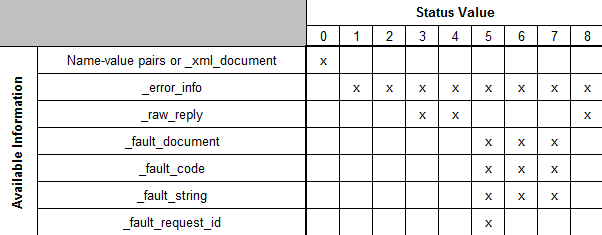
Reply Key Descriptions
- _error_info: Information about the error that occurred
- _raw_reply: The server’s raw reply
- _fault_document: The entire, unparsed fault document
- _fault_code: The fault code, which indicates where the fault originated
- _fault_string: The fault string, which describes the fault.
- _fault_request_id: The request ID for the request.
Possible Return Status Values
The cybs_run_transaction() function returns a status indicating the result of the request. Table 16 describes the possible status values, including whether the error is critical. If an error occurs after the request has been sent to the server, but the client cannot determine whether the transaction was successful, then the error is considered critical. If a critical error happens, the transaction may be complete in the Cybersource system but not complete in your order system. The descriptions below indicate how to handle critical errors.
The sample code (when run from a command prompt) displays a numeric value for the return status, which is listed in the first column.
Numeric Value (for Sample
Code) | Value | Description |
|---|---|---|
0 | CYBS_S_OK | Critical: NoResult:
The client successfully received a reply.Keys in **ppReply:
For name-value pair users, **ppReply has the reply
name-value pairs for the services that you requested.For XML users,
** ppReply contains the _xml_document
key, with the response in XML format.Manual action to take:
None |
1 | CYBS_S_PRE_SEND_ERROR | Critical: NoResult:
An error occurred before the request could be sent. This usually indicates a
configuration problem with the client.Keys in **ppReply:
_error_info Manual action to take: Fix the
problem described in the error information. |
2 | CYBS_S_SEND_ERROR | Critical: NoResult:
An error occurred while sending the request.Keys in **ppReply:
_error_info Manual action to take:
NoneA typical send error that you might receive when
testing occurs if the ca-bundle.crt file is not located in
the same directory as your security key. See the description of the
sslCertFile configuration parameter in Configuration Settings for information about how
to fix the problem. |
3 | CYBS_S_RECEIVE_ERROR | Critical:
YesResult: An error occurred while waiting for or retrieving
the reply.Keys in **ppReply: _error_info
_raw_reply Manual action to take:
Check the Transaction Search page in the Business Center to
verify that the request was processed, and if so, whether it succeeded.
Update your transaction database appropriately. |
4 | CYBS_S_POST_RECEIVE_ERROR | Critical:
YesResult: The client received a reply or a fault, but an error
occurred while processing it.Keys in
**ppReply: _error_info
_raw_reply Manual action to
take: Examine the value of _raw_reply . If you cannot
determine the status of the request, then check the Transaction Search pages
in the Business Center to verify that the request was processed, and
if so, whether it succeeded. Update your transaction database
appropriately. |
5 | CYBS_S_CRITICAL_SERVER_FAULT | Critical:
YesResult: The server returned a fault with
_fault_code set to CriticalServerError.Keys in
**ppReply: _error_info
_fault_document _fault_code _fault_string _fault_request_id Manual
action to take: Check the Transaction Search pages in the Business Center to verify that the request succeeded. When searching for
the request, use the request ID provided by
_fault_request_id . |
6 | CYBS_S_SERVER_FAULT | Critical: NoResult:
The server returned a fault with _fault_code set to ServerError, indicating
a problem with the Cybersource server.Keys in
**ppReply: _error_info
_fault_document _fault_code _fault_string Manual
action to take: None |
7 | CYBS_S_OTHER_FAULT | Critical: NoResult:
The server returned a fault with _fault_code set to a value other than
ServerError or CriticalServerError. Indicates a possible problem with
merchant status or the security key. Could also indicate that the message
was tampered with after it was signed and before it reached the Cybersource server.Keys in
**ppReply: _error_info
_fault_document _fault_code _fault_string Manual
action to take: Examine the value of the
_fault_string and fix the problem. You might need to
generate a new security key, or you might need to contact Customer Support
if there are problems with your merchant status. For more information, see
).A typical error that you might
receive occurs if your merchant ID is configured for “test”
mode but you send transactions to the production server. See the description
of the sendToProduction configuration parameter in Configuration Settings for information about
fixing the problem. |
8 | CYBS_S_HTTP_ERROR | Critical: NoResult:
The server returned an HTTP status code other than 200 (OK) or 504 (gateway
timeout). Note that if a 504 gateway timeout occurs, then the
status=3 .Keys in
**ppReply: _error_info
_raw_reply (contains the HTTP response
body, or if none was returned, the literal "(no response
available)") .Manual action to take:
None. |
The figure below summarizes the reply information you receive for each status value.